For salons, spas, clinics & studios
Salon Management Software
Clients book 24/7 on a branded page while you run the day from one screen — no per-booking commission, ever, and no per-seat fees as your team grows. Free for 7 days, then US$49.99 a month flat.
- Let clients book 24/7 and pay online or at your salon
- See your entire team's schedule in one clear calendar
- Reduce no-shows with secure deposits and verified bookings
- Win new clients who find your salon searching on Google
Free for 7 daysNo credit card todayThen US$49.99/month, cancel anytime






Salon owners already running their week on Kevonia. Read what they say
Allyour appointments
in one clear view
in one clear view
Live Kevonia walkthrough
Booking page liveClients can book 24/7
Hair salons Hair stylists Barbershops Tattoo studios Nail salons Waxing salons Day spas Med spas Esthetic clinics Yoga studios Wellness studios Massage therapists Brows & lashes Beauty clinics
NOT A SCREENSHOT
Try before you buy — no signup required.
The calendar, the client list, the service menu, the payouts — the same screens a salon owner opens every morning, filled with Sunday Studio's day. On a computer, the menu switches between them.
Open the full demo workspace →kevonia.com/dashboardCLICK THE MENU TO EXPLORELIVE PREVIEW
K kevonia

Sunday StudioBrooklyn, NY
✦Need help?
Follow a guide or contact us while you set up your salon.
Browse help centerMA
Mia AnderssonOwner
•••Sunday Studio demo · Explore every section with protected example data.Create your own workspace →
MONDAY, JULY 20
Good afternoon, Sunday Studio
Here's what's happening at your salon today.kevonia.com/sunday-studioShare booking URL+ New booking
Today's revenue
↗Appointments
▣Total clients
♟No-shows
◷Revenue, last 30 days$31,670 collected across 25 trading days
BEST DAY
$2,070Jul 3- Jun 24 · $496.80
- Jun 25 · $1076.40
- Jun 26 · $621.00
- Jun 27 · $1614.60
- Jun 28 · $1159.20
- Jun 30 · $1179.90
- Jul 1 · $372.60
- Jul 2 · $1097.10
- Jul 3 · $683.10
- Jul 4 · $1138.50
- Jul 6 · $1283.40
- Jul 7 · $558.90
- Jul 8 · $910.80
- Jul 9 · $641.70
- Jul 10 · $1573.20
- Jul 11 · $1200.60
- Jul 13 · $1242.00
- Jul 14 · $538.20
- Jul 15 · $1055.70
- Jul 16 · $434.70
- Jul 17 · $1697.40
- Jul 18 · $1635.30
- Jul 19 · $931.50
- Jul 20 · $331.20
Today's schedule14 appointments · 4 team members
- AAAmelia AndersonGloss treatment · 75 min
WITHElin
Confirmed••• - CTCamila TurnerColor · 60 min
WITHMatt
Confirmed••• - ARAvery RobertsColor consultation · 30 min
WITHMia
Confirmed••• - SJScarlett JacksonGloss treatment · 75 min
WITHSara
Confirmed••• - MCMila CampbellCut & blowout · 60 min
WITHMia
Confirmed•••
Team todayLive schedule
- Mia3 appointments
- Elin4 appointments
- Matt4 appointments
- Sara3 appointments




PAYMENTSPayments are activeClient payments are ready.
THE SAME SALON, FROM THE OTHER SIDE
And this is what your clients see.
The page Sunday Studio shares from its Instagram bio, live on this one. Every salon gets the same one at kevonia.com/your-salon, with its own name, photo, service menu and team — and clients book from it without an account.
Open the booking page →This is your own salon, fifteen minutes from now.Free for 7 days. No credit card, and no commission on your bookings.
Start free for 7 days →ONE WORKSPACE. LESS CHAOS.
Online salon software that runs the day with you, not against you.
Kevonia is salon management software for hair, nail, waxing and spa businesses, giving owners a clean operational view of the business while clients get an easy, branded way to book online. No enterprise clutter, no training week, no per-booking fees.
SEE KEVONIA IN MOTION
From a busy day to a confirmed booking.
Twenty-eight seconds through the real workspace: the morning dashboard, the team calendar, staff setup, and a client booking online.
Explore the live demo →Kevonia guided walkthrough28 SEC
RECORDED IN KEVONIA
01
DASHBOARD · 10 SEC
Open the day and know it
Revenue, appointments and who is on shift, before the first client arrives.
02
CALENDAR · 11 SEC
Filter the calendar
Move from the full team to one professional's whole week in a click.
03
TEAM · 09 SEC
Set up every professional
Profiles, the services they perform, their hours and their time off.
04
BOOKING PAGE · 11 SEC
Clients book themselves
Service, stylist and genuinely free times — on desktop or phone.
Ready to see your salon in Kevonia?No credit card. Every feature included for 7 days.
Start free for 7 days →THE WHOLE BUSINESS, IN VIEW
Four screens. One calmer workday.
Move from the schedule to your team, service menu, and revenue without losing your place.
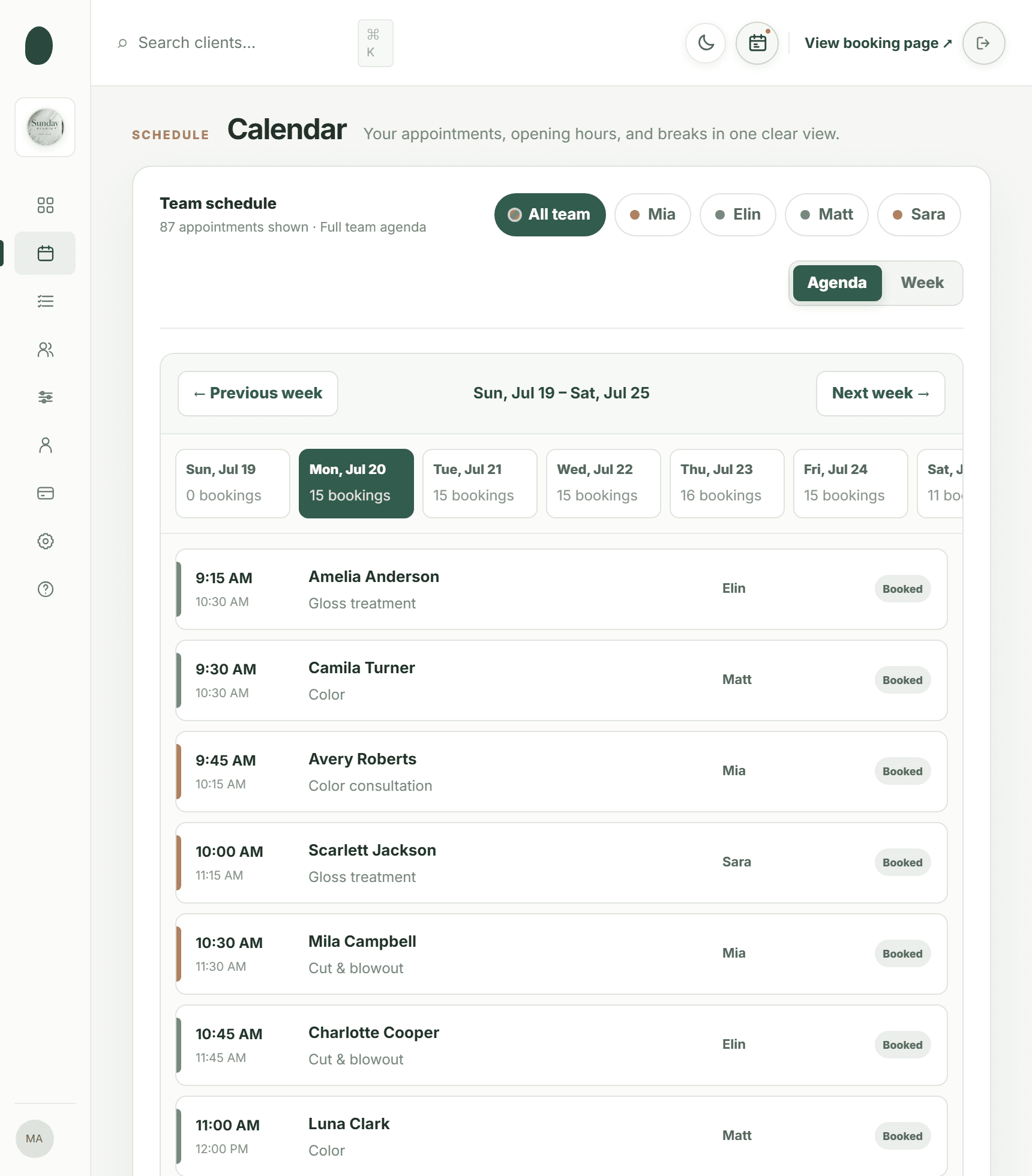
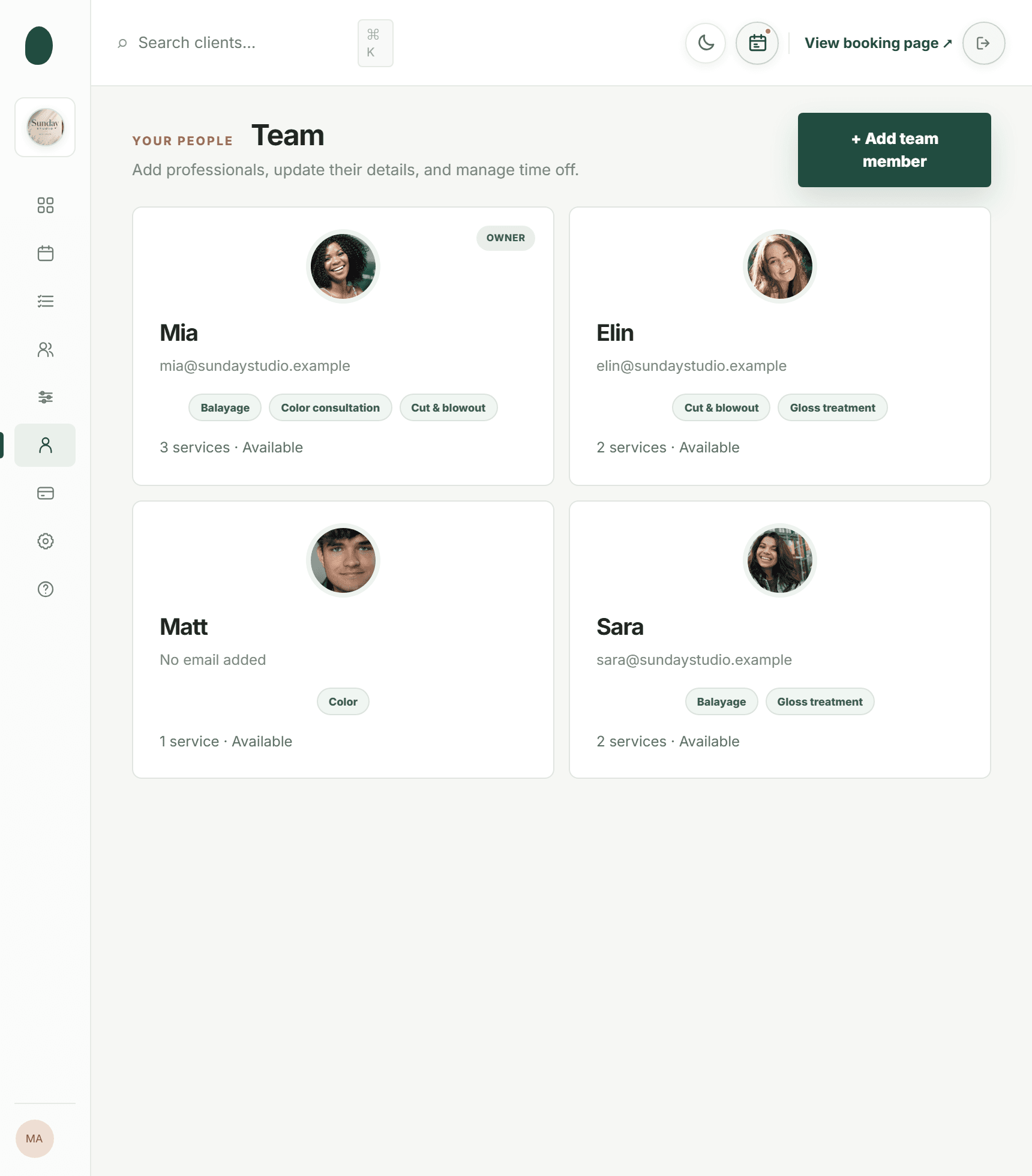
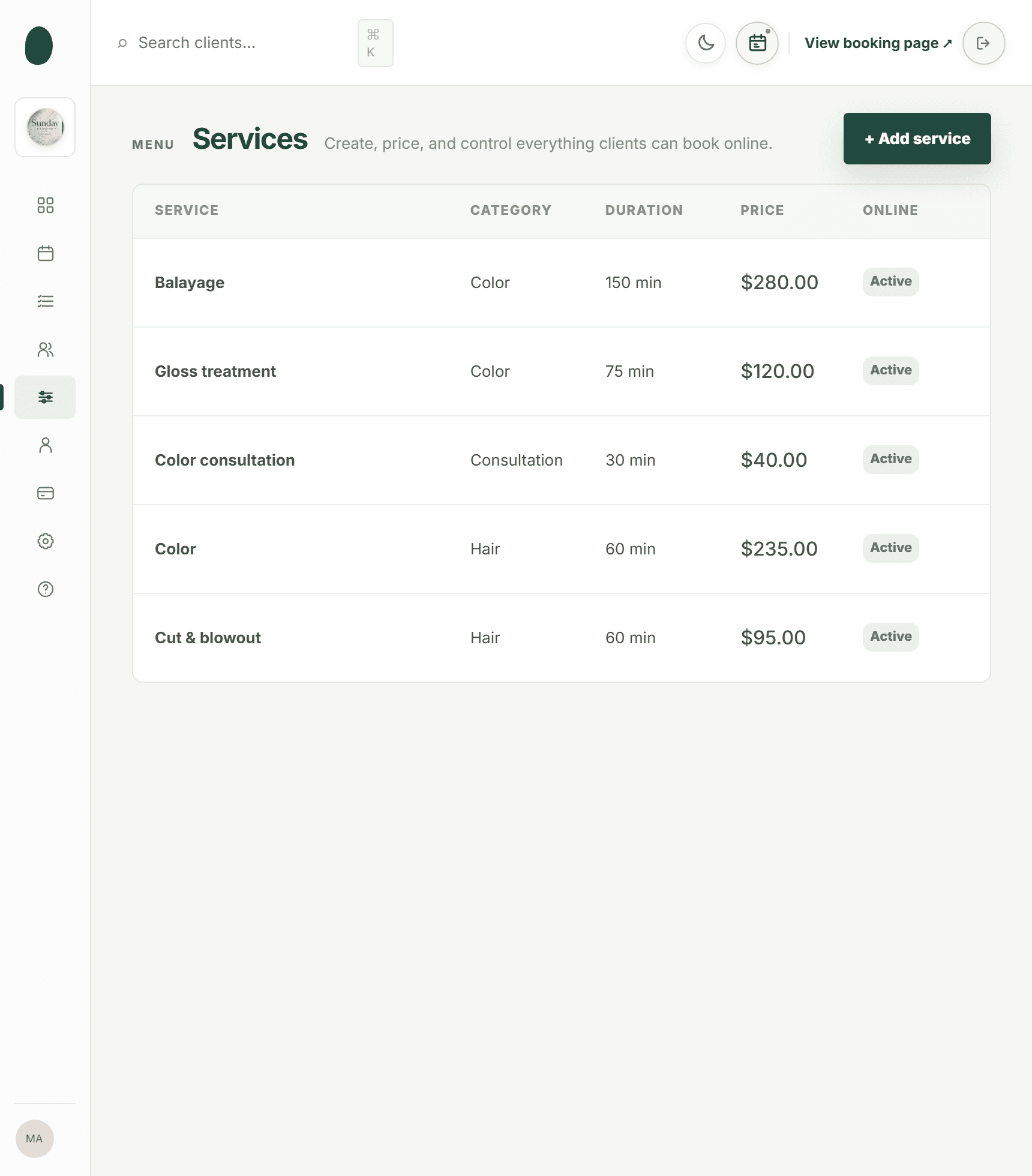
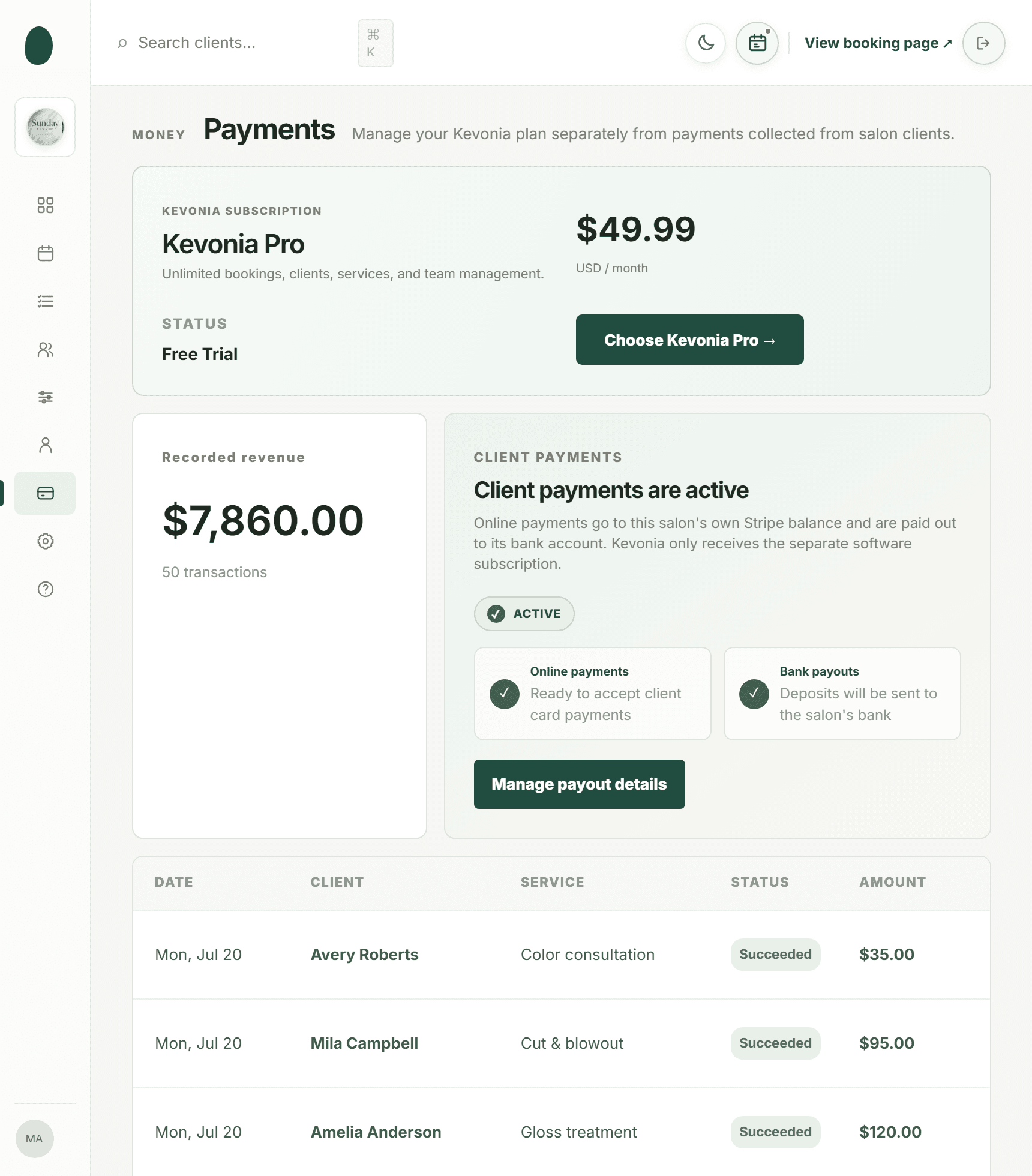
01 · SCHEDULE
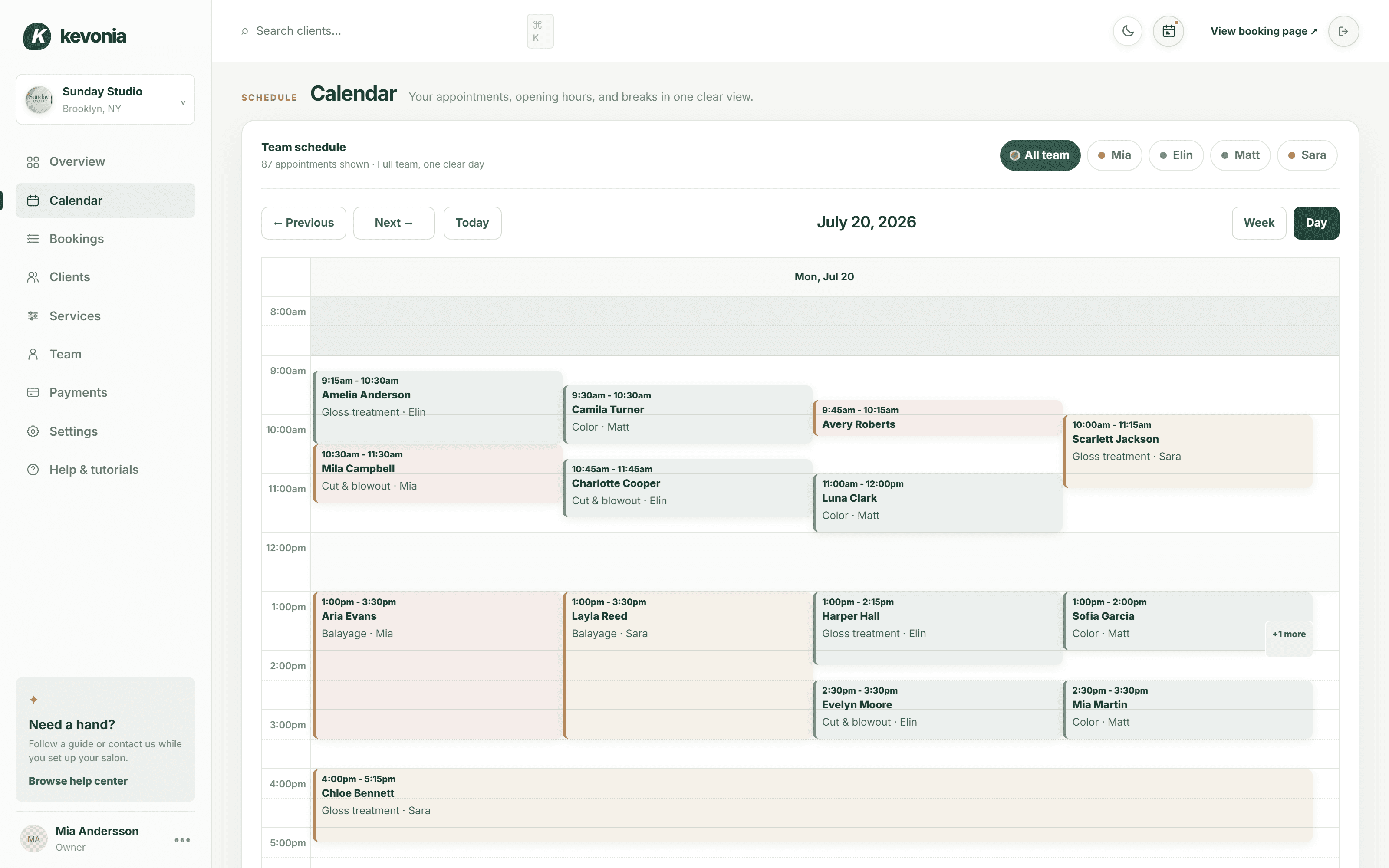
See the whole week. Find any appointment fast.
Kevonia's appointment scheduling software lets you switch between week and day views, filter the salon calendar by professional, and open a booking directly from the calendar to edit, reschedule, or cancel it.
- Team filters and color-coded bookings
- Breaks and working hours shown in context
- Conflict protection before changes are saved
app.kevonia.com
02 · CLIENTS
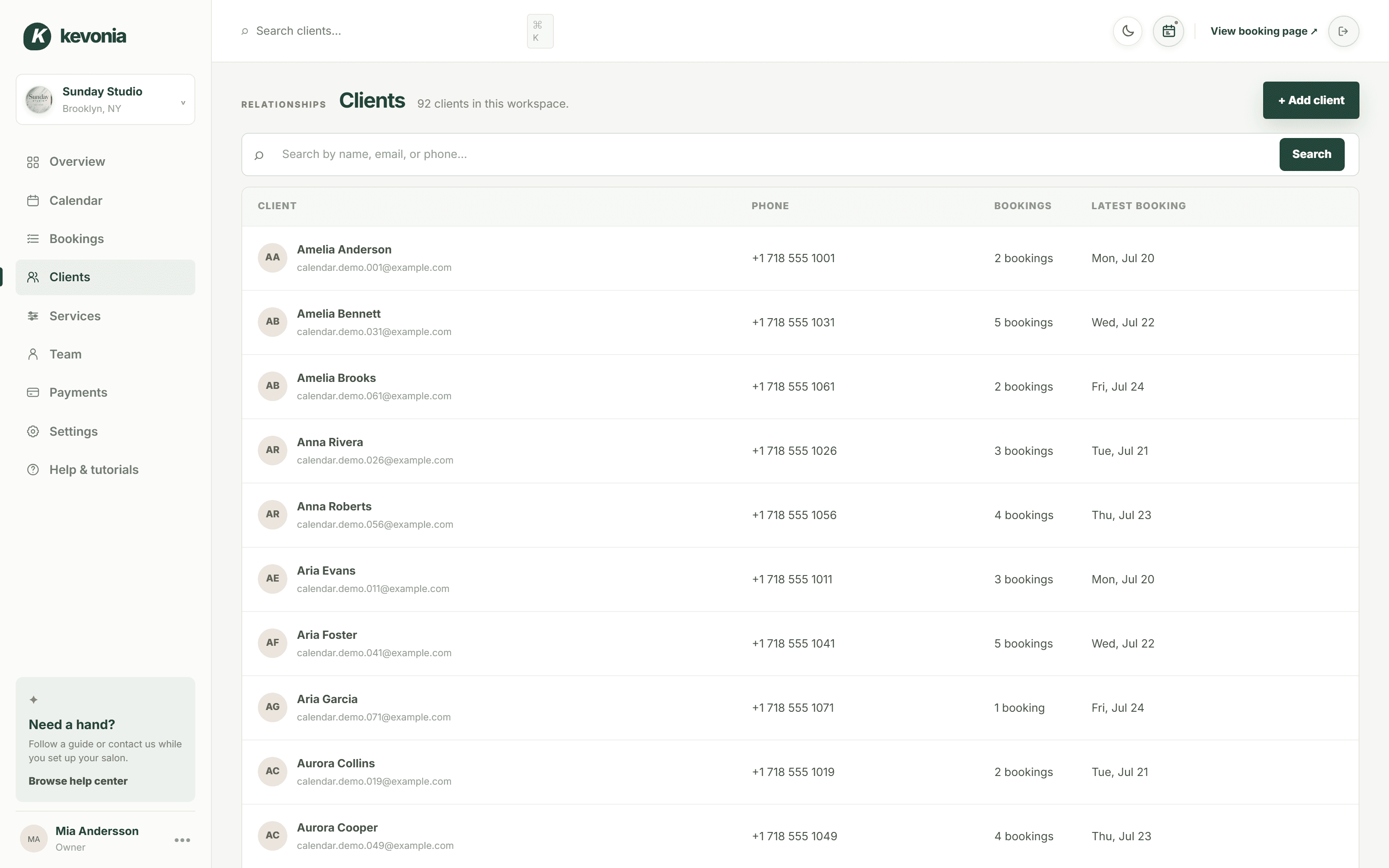
Remember the person, not just the appointment.
Keep client contact details, private notes, and visit history together. Search across hundreds of records without scrolling through an endless list.
- Search by name, email, or phone
- Visit count and last visit at a glance
- Details stay synced with every booking
app.kevonia.com
03 · YOUR BOOKING PAGE
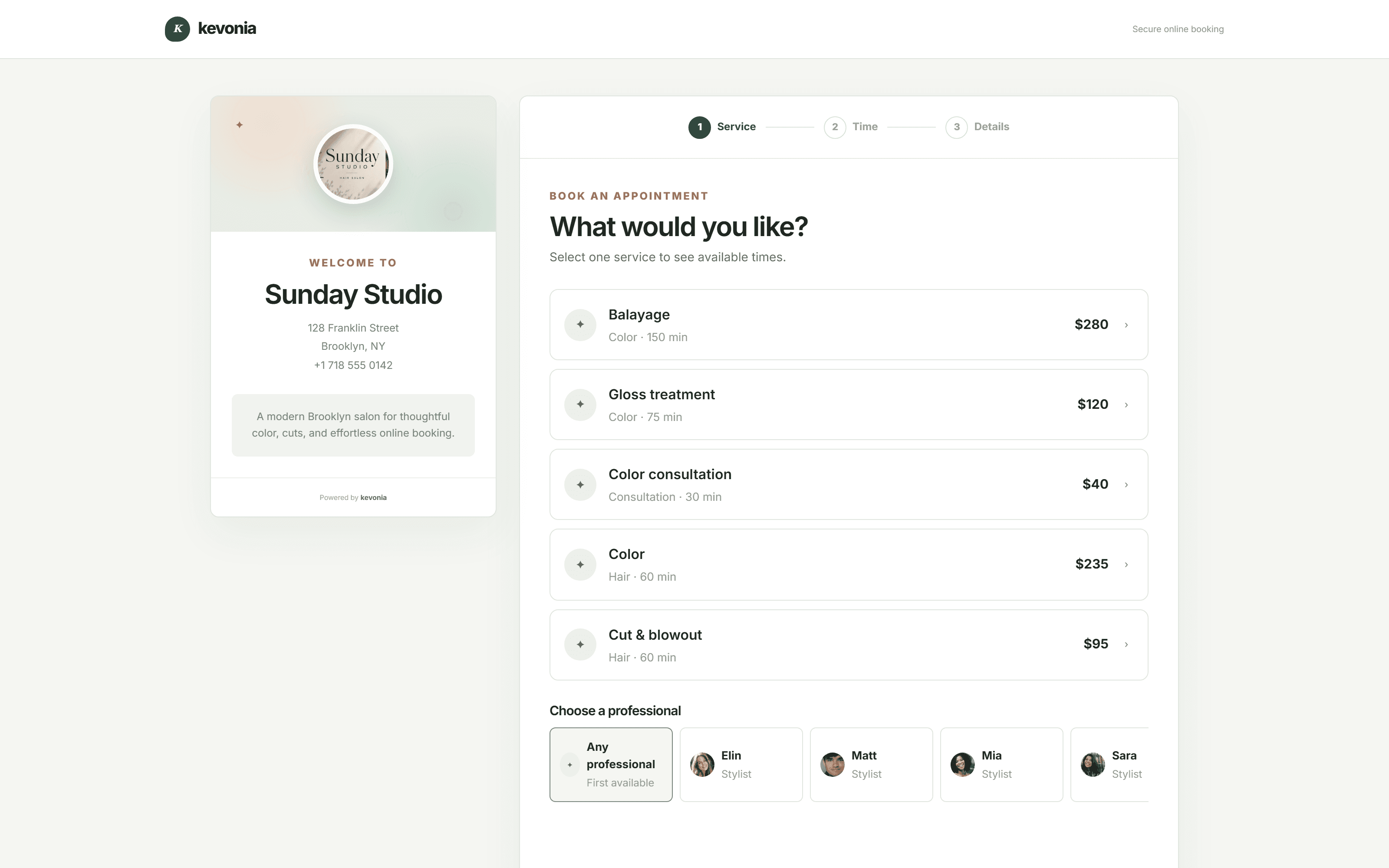
A booking experience that feels like your business.
Share one short link from your website, Google Business Profile, or Instagram bio. Clients choose a service, a professional, a genuinely available time, and enter their details.
- Your salon name, image, address, and description
- Only genuinely available times can be selected
- Optional deposit before the slot is held
app.kevonia.com
BUILT FOR THE REAL WORKDAY
Powerful where it matters. Simple everywhere else.
Most salon management software buries the basics under menus. Here your team can understand the essentials on day one.
Online booking, 24/7
Give clients a polished salon booking page with your services, team, real availability, and branding — open while you sleep.
One clear team calendar
See every appointment in week or day view, filter by professional, and reschedule in a few clicks.
Client records that stay useful
Search by name, email, or phone and keep contact details, private notes, and visit history together.
Services and pricing
Control service duration, price, deposit, cleanup time, and which professionals can be booked for each service.
Availability that reflects real life
Set opening hours, multiple breaks, staff time off, vacations, and temporary salon closures.
Safer booking operations
Prevent double-booking, track cancellations, restore appointments, and keep cancelled booking history searchable.
Reminders that cut no-shows
An automatic email the day before, with links to move or cancel. A slot handed back the night before can still be sold — a no-show cannot.
ONE SUBSCRIPTION. NOTHING HELD BACK.
Everything you get with Kevonia Business.
No feature tiers, no add-on pricing, no per-booking commission. Every salon on the US$49.99 plan gets all 48 capabilities below — and every one of them is unlocked during your free trial.
Calendar & appointments
The daily schedule your whole team can read at a glance.
- Week and day calendar views
- Filter the calendar by professional
- Color-coded bookings per team member
- Create, edit, reschedule, or cancel in place
- Double-booking protection on every save
- Booking notes and source tracking
Your own booking page
A branded page clients can book from on any device.
- Your own address: kevonia.com/your-salon
- Salon photo, description, address, and hours
- Service → professional → date → time flow
- Only genuinely free times are selectable
- Mobile-first, fast, and accessible
- Switch online booking on or off anytime
Client records
Remember the person, not just the appointment.
- Unlimited client records
- Search by name, email, or phone
- Visit count and last visit date
- Private notes only your team sees
- Paginated directory that stays fast
- Details stay in sync with bookings
Services & pricing
Your menu, priced and timed exactly the way you work.
- Unlimited services with categories
- Duration plus cleanup or buffer time
- Price and optional deposit per service
- Choose which professionals can perform it
- Hide a service from online booking
- Descriptions clients see before booking
Team & availability
Everyone gets the right hours, the right services, the right slots.
- Unlimited team members, no per-seat fee
- Profile photo, colour, email, and phone
- Per-professional service assignment
- Opening hours for every weekday
- Multiple labelled breaks per day
- Staff time off, vacations, and salon closures
Payments & revenue
Get paid online and see what the day actually earned.
- Secure card payments powered by Stripe
- Deposits to protect high-value slots
- Payment status on every booking
- Revenue and transaction history
- Payouts straight to your bank account
- Guided Stripe onboarding inside the app
Rules & controls
Booking on your terms, not the software's.
- Booking window: how far ahead clients book
- Minimum notice before a slot can be taken
- Time-slot interval that fits your services
- Time zone, currency, and salon profile
- Cancellation history with restore
- Light and dark mode for late finishes
Client emails & reminders
Everyone hears the right thing at the right time.
- Booking confirmation the moment a slot is taken
- Automatic reminder the day before the appointment
- Clients move their own appointment from the email
- Clients cancel online within your notice window
- You are told the moment a client cancels
- Refund confirmation sent to the client automatically
Setup & support
You are never left staring at an empty dashboard.
- Guided setup checklist after signup
- Built-in help centre and tutorials
- Sign in with Google or email
- Live demo workspace to explore first
- All features unlocked during the trial
- No setup fee and no contract
FOR THE LATE FINISHES
One tap, and the whole workspace turns the lights down.
Salons close long after the sun does. Dark mode lives in the top bar of every screen, so the last hour of the day is not spent staring into a white page.
- Switch it from the top bar, on any screen
- The whole workspace follows: calendar, clients, services, payments
- Remembered on your device, so it opens the way you left it
BEFORE AND AFTER
The difference clients feel on the first booking.
Most salons do not lose money on bad haircuts. They lose it on missed calls, forgotten notes, and slots that quietly stayed empty.
In the salonNotebook, phone & DMsWith Kevonia
Taking a bookingPhone call, DM, or a note you hope to rememberClient books the free slot themselves, day or night
Checking availabilityFlipping pages or asking three colleaguesOne calendar, filtered to any professional
Double bookingsFound out when two clients arrive at onceBlocked before the appointment can be saved
No-showsAbsorbed as lost incomeA reminder the day before, and deposits on the slots worth protecting
Moving an appointmentA phone call during opening hours, if they get throughThe client picks a new time from your calendar themselves
Client historyScattered across phones, chats, and paperSearchable record with notes and past visits
Getting paidCash, terminal, or chasing afterwardsCard payments online, payouts to your bank
THE MATH IS UNCOMFORTABLY SIMPLE
US$49.99 a month is roughly one appointment.
Recover a single no-show with a deposit, or let one client book a slot at midnight that would otherwise have gone empty, and Kevonia has already paid for the month. Everything after that is upside.
MADE TO FIT YOUR BUSINESS
Not every salon looks the same. Your software shouldn't assume it does.
Unlike rigid online booking programs, Kevonia lets you set your own services, durations, prices, deposits, team, opening hours, cleanup time, breaks, and booking window. It adapts to how you already work instead of the other way around.
Start with your setup01Hair salons↗02Hair stylists↗03Barbershops↗04Tattoo studios↗05Nail salons↗06Waxing salons↗07Day spas↗08Med spas↗09Esthetic clinics↗10Yoga studios↗11Wellness studios↗12Massage therapists↗13Brows & lashes↗14Beauty clinics↗
LIVE IN THREE STEPS
Salon scheduling software you can set up in an afternoon.
Set up the essentials first. You can refine the details as your business grows.
Add your business
Enter your salon details, branding, address, time zone, currency, and booking rules.
Build your schedule
Add services and prices, invite professionals, and set opening hours, breaks, and time off.
Share your booking link
Put your Kevonia link on your website, Instagram, Google Business Profile, or anywhere clients find you.
FROM SALONS USING KEVONIA
The switch pays for itself in the first month.
Fewer no-shows, fewer missed calls, and a calendar that fills while the salon is shut.
We've been using Kevonia for several months and it has completely changed how we manage appointments. Our clients love how easy it is to book online, and we save hours every single week.
Emily Carter
By far the best salon booking software we've used. It saves us time every day, and the online booking process has increased the number of appointments we get.
David Thompson
The automatic reminders have significantly reduced our no-shows, and scheduling has never been easier. It's simple, reliable, and our clients constantly compliment the booking experience.
Ashley Brooks
I was surprised by how easy it was to get started. Within a single day our entire salon was set up and running smoothly. The interface is clean, modern and genuinely easy to use.
Jessica Miller
Managing multiple stylists used to be a challenge, but this keeps everyone's schedule organised. It helps us stay more efficient while giving our clients a better experience.
Michael Johnson
Excellent software with outstanding support. Our clients appreciate being able to book anytime, and we appreciate having everything in one place. I'd recommend it to any salon owner.
James Wilson
Start your free 7-day trialNo credit card today · US$49.99/month after · Cancel anytime
ONE SIMPLE PLAN
Start free. Keep it when it earns its place.
Explore the complete workspace for 7 days with every feature unlocked. Upgrade only when you are ready to keep using it — and cancel from your billing settings whenever you want.
- No credit card required to start
- No setup fee, no contract, no lock-in
- 0% commission on every booking you take
KEVONIA BUSINESSUS$49.99/month
7 DAYS FREE- Unlimited bookings, clients, and services
- Unlimited team members
- Branded online booking page
- Week and day team calendar
- Client records, notes, and history
- Deposits and card payments via Stripe
- Breaks, time off, and closures
- Booking rules and minimum notice
- Cancellation history with restore
- Help centre, tutorials, and dark mode
No credit card today. Cancel before your trial ends and you are never charged.
Nothing to lose today
The trial starts without a card. If Kevonia is not right for your salon, do nothing and it simply ends.
Live the same day
Add services, professionals, and opening hours, then share your link. Most salons finish setup in well under an hour.
Your data stays yours
Client details and booking history belong to your business, and card payments run on Stripe's secure infrastructure.
QUESTIONS, ANSWERED
Before you make the switch.
Still unsure? Open the live demo workspace and click through a full salon week before you sign up.
What is Kevonia?+
Kevonia is salon and spa management software: an online booking page for your clients plus a workspace where you manage appointments, clients, services, team schedules, availability, and payments in one place.
Who is Kevonia built for?+
Hair salons, barbershops, tattoo studios, nail salons, day spas, med spas, beauty clinics, brow and lash studios, and any other appointment-based business that books clients by service and professional.
How do clients book an appointment?+
Kevonia's online appointment scheduling software gives you a salon booking link to share from your website, Google Business Profile, or Instagram. Clients pick a service, a professional, a date, and one of your genuinely available times, then enter their contact details. The booking appears in your calendar instantly.
Can I control exactly when clients can book?+
Yes. Kevonia puts the appointment scheduling rules in your hands: opening hours per weekday, your booking window, minimum notice before a slot can be taken, the time-slot interval, multiple daily breaks, staff time off and vacations, and full-salon closures.
Does Kevonia stop double bookings?+
Yes, and it is the main reason salons move from a paper diary to a proper booking system. Every booking is checked against opening hours, breaks, time off, closures, and existing appointments before it can be saved, so the same professional cannot be booked twice for the same time.
Does Kevonia work for spas as well as salons?+
Yes, without any changes. Set each service or treatment's duration, cleanup time, price, and deposit, assign it to the professionals who perform it, and let clients book only times that are genuinely free.
Can I take payments and deposits online?+
Yes. Connect your Stripe account from the Payments section to accept card payments, request a deposit per service, follow payment status on each booking, and receive payouts to your bank account.
How many team members are included?+
As many as your salon needs. Every plan includes unlimited team members, bookings, clients, and services. You are never charged per professional, so growing your team costs you nothing extra.
How long does setup take?+
Most salons are live the same day. Add your salon details, your service menu, your professionals, and your opening hours, then share your booking link. A setup checklist and help centre guide you through each step.
What happens after the 7-day free trial?+
Nothing is charged during the trial and no credit card is needed to start. When the trial ends you can continue on the US$49.99 per month plan, or simply stop. You can cancel from your billing settings at any time.
Can I try it before signing up?+
Yes. The live demo workspace is filled with real-looking appointments, clients, and services so you can click through the calendar, team, services, and payments screens before you create an account.
From the blog
Running a salon, written down

Comparison
The Right Spasalon Alternative for Premium Salon Operations
Premium salons need more than a polished booking page. Compare Spasalon, Vagaro, Fresha, Boulevard, and Kevonia by cost, control, team fit, and everyday reliability.
·9 min read

Comparison
Salon Ultimate Alternative: Compare Booking Control and Total Cost
Looking for a Salon Ultimate alternative? Compare the published pricing, operating model, booking controls, and trade-offs before moving your salon or spa.
·8 min read

Comparison
Booker Alternative: Compare Cost, Complexity, and Fit
If Booker feels too expensive or too complex, Kevonia offers a simpler flat-cost alternative for salons, spas, and independent beauty teams.
·8 min read

Comparison
DaySmart Salon Alternative: Compare Cost, Control, and Fit
DaySmart Salon is capable, but its tiered pricing and broad feature set are not right for every salon. Compare the practical trade-offs before switching.
·12 min read
YOUR NEXT CALMER DAY STARTS HERE
Run the business.
Lose the busywork.
Try Kevonia free for 7 days and explore the complete salon booking workspace — every feature, no card, no commitment.
No charge today · US$49.99/month after your trial · Cancel anytime