Nail salon booking software
Nail salon booking software
Clients choose their set, their technician and a time that is really free, on a booking page that looks like your salon. You keep every table, every infill and every regular in one place.
- A full set gets booked at midnight without a single message
- Every technician has her own column and her own hours
- Soak-off, build and cure time are part of the service, not an afterthought
- Deposits hold the long sets that hurt when they disappear
Free for 14 daysNo credit card todayThen $49.99/month, cancel anytime






Salon owners already running their tables on Kevonia. See their words
Everytable, tech and
set in one calendar
set in one calendar
Live Kevonia walkthrough
The page is openClients booking whenever they like
Nail salons Nail bars Acrylic specialists Gel & BIAB studios Nail art studios Pedicure spas Manicure bars Nail & beauty salons Mobile nail techs Home studios Nail suites Nail academies Nail & lash bars Nail salons Nail bars Acrylic specialists Gel & BIAB studios Nail art studios Pedicure spas Manicure bars Nail & beauty salons Mobile nail techs Home studios Nail suites Nail academies Nail & lash bars
OFF THE PHONE. ONTO THE TABLE.
Nail salon booking software that understands the difference between an infill and a full set.
Nail work is a chain of timed steps — soak off, prep, build, cure, finish — and it varies enormously by service and by technician. A generic diary flattens all of that into identical blocks. Kevonia lets you time every service properly, decide who performs it, and then guards that slot so nothing gets squeezed in on top of it.
SEE IT RUNNING
From an empty table to a booked full set.
About half a minute in the real workspace: the day's figures, one technician's week lifted out of the salon view, setting her up, and a client booking her own set.
Play with the demo salon →A nail salon on Kevonia28 SEC
RECORDED IN THE APP
01
THE FIGURES · 10 SEC
The day in one glance
What has been taken so far, what is booked, and who is on which table.
02
THE TABLES · 11 SEC
One technician, one column
Drop from every table at once to a single tech's full week.
03
TECHNICIANS · 09 SEC
Set a technician up
The services she does, the shifts she works, the days she is off.
04
HER SET · 11 SEC
A client books her set
Service, technician, a three-hour gap that genuinely exists — from her phone.
Want to see your salon in there?Fourteen days with everything on, and nothing taken up front.
Set your salon up free →THE SALON IN FOUR SCREENS
Everything you check before the first client sits down.
What is booked in, who is on which table, what each service costs, and what has cleared into the bank.
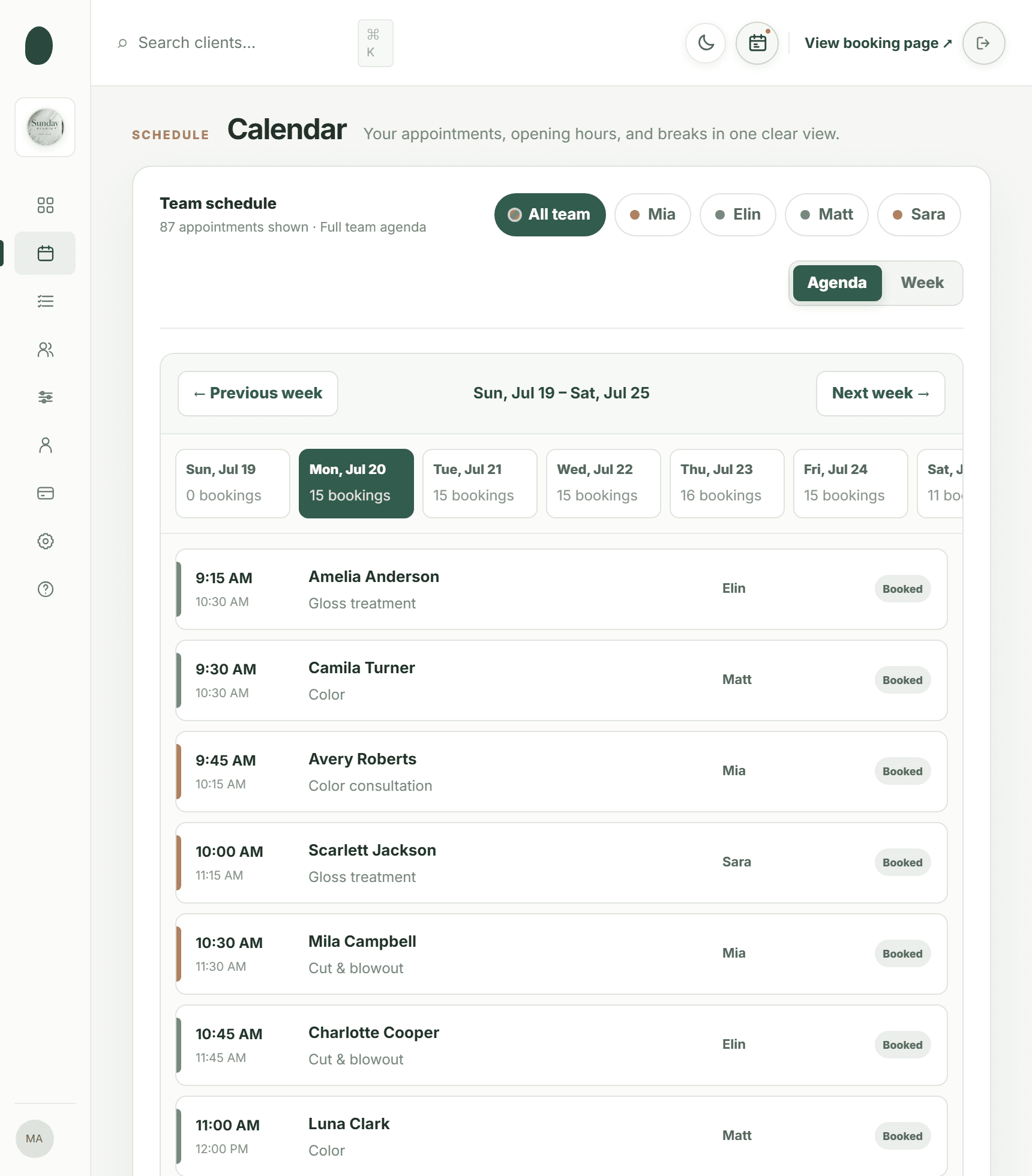
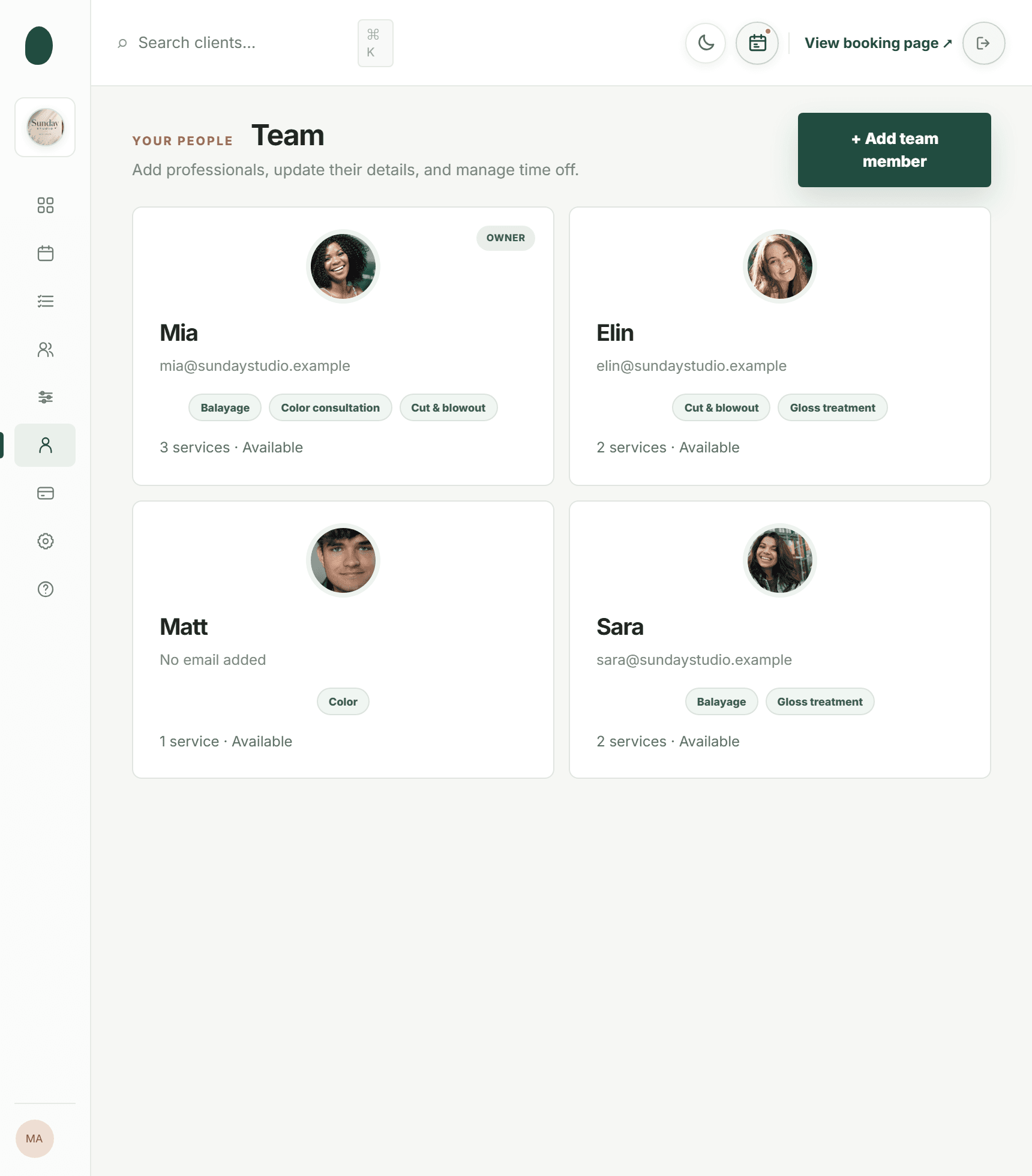
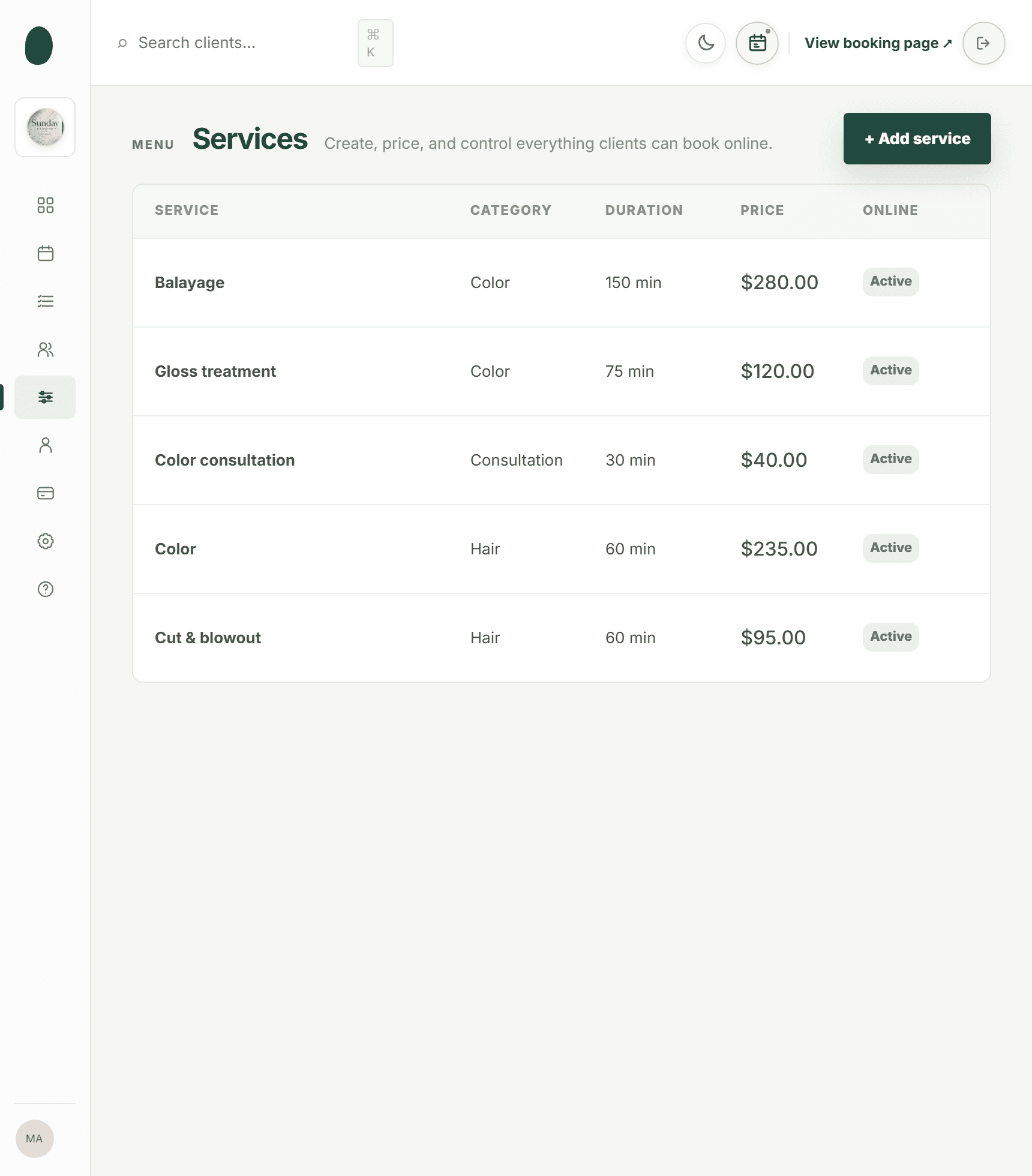
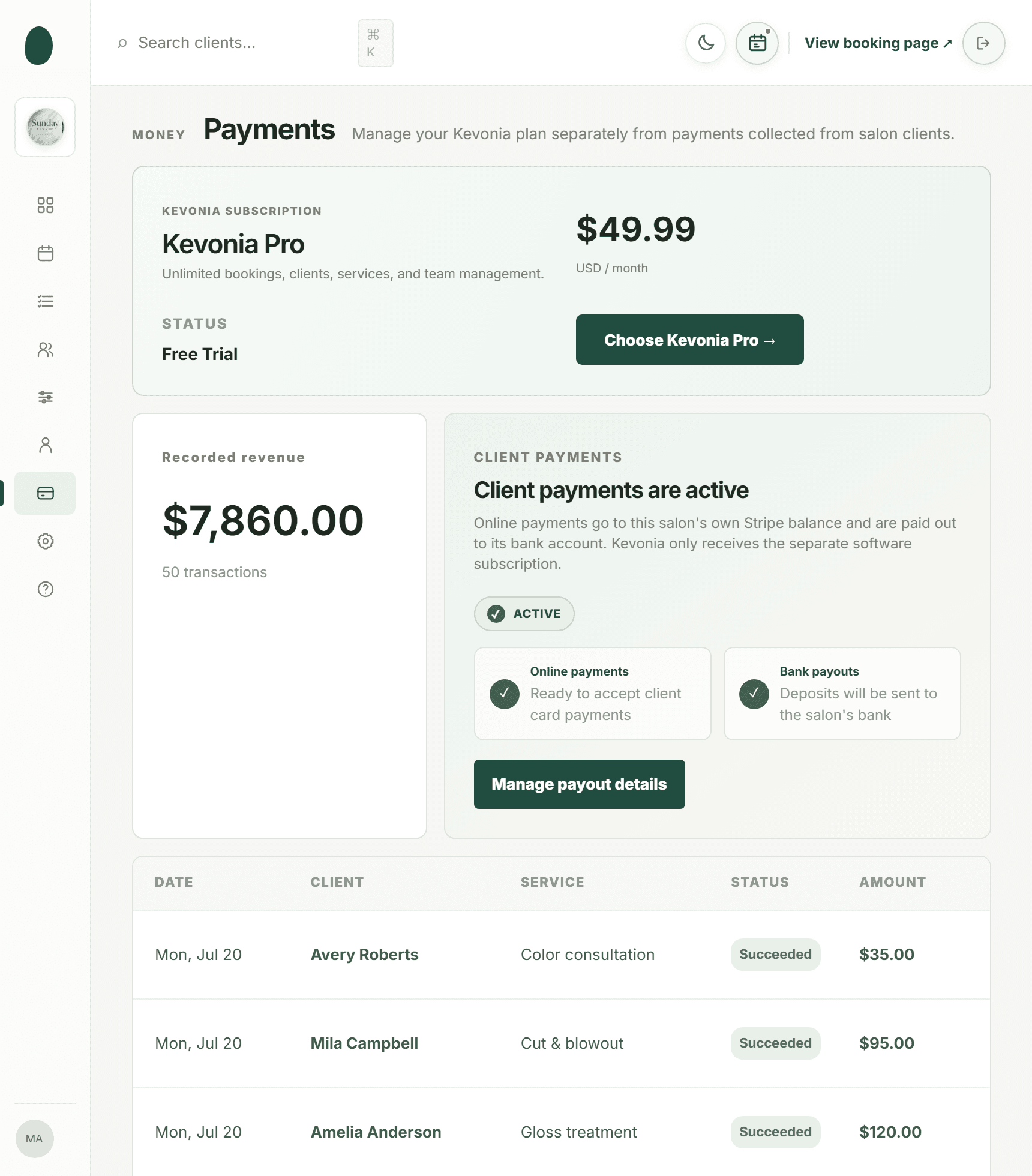
01 · THE TABLES
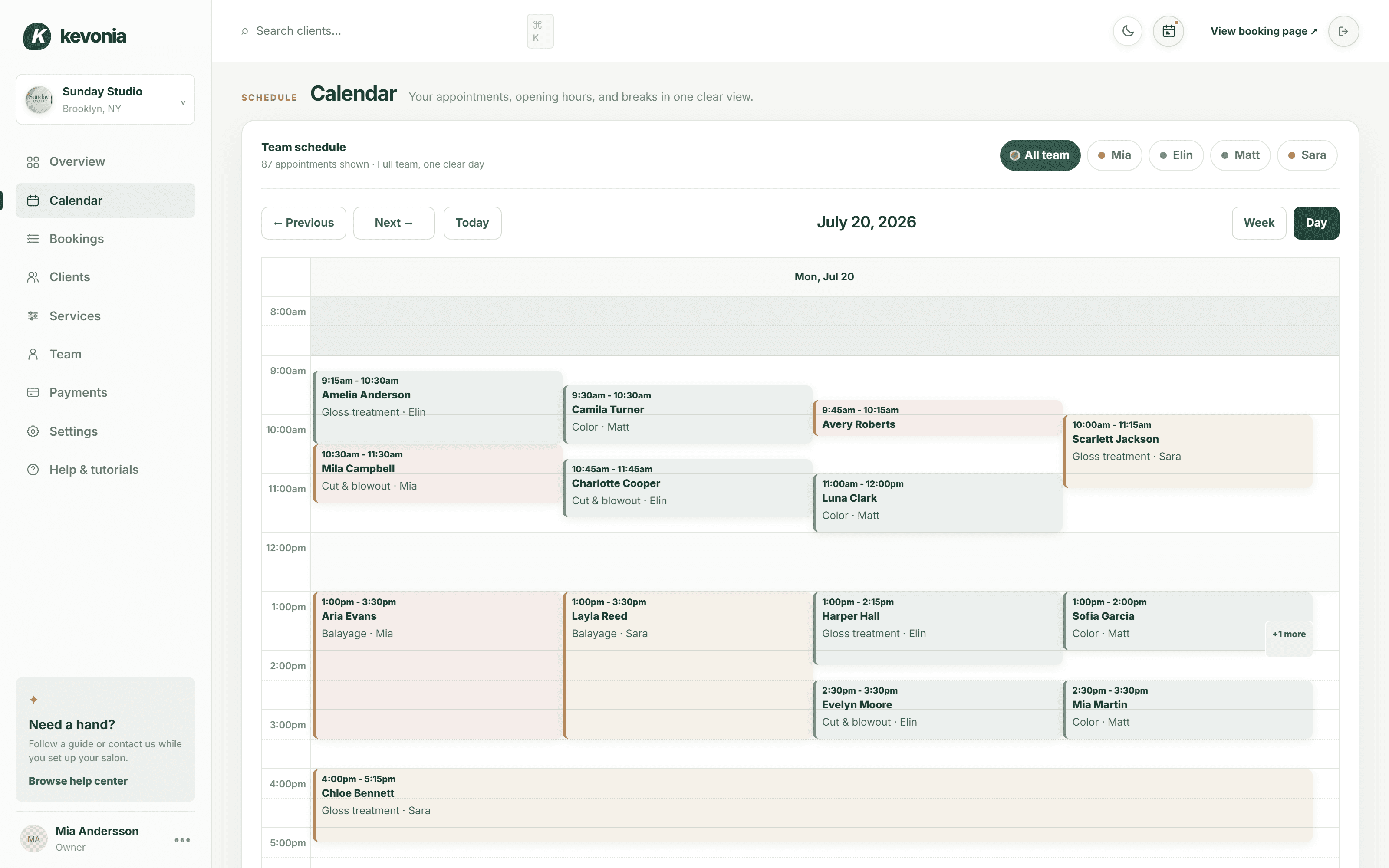
Four tables, four columns, no crowding round the diary.
Look at the whole week or drop into one day, then filter to whichever technician a client asks for. Open an appointment straight from the grid to change the service, move it to another tech, or cancel it — the clash check runs before it is allowed through.
- A colour per technician, readable across the salon
- Breaks, lunch and leave drawn into the day
- A change that would collide is refused, not saved
app.kevonia.com
02 · HER NAILS
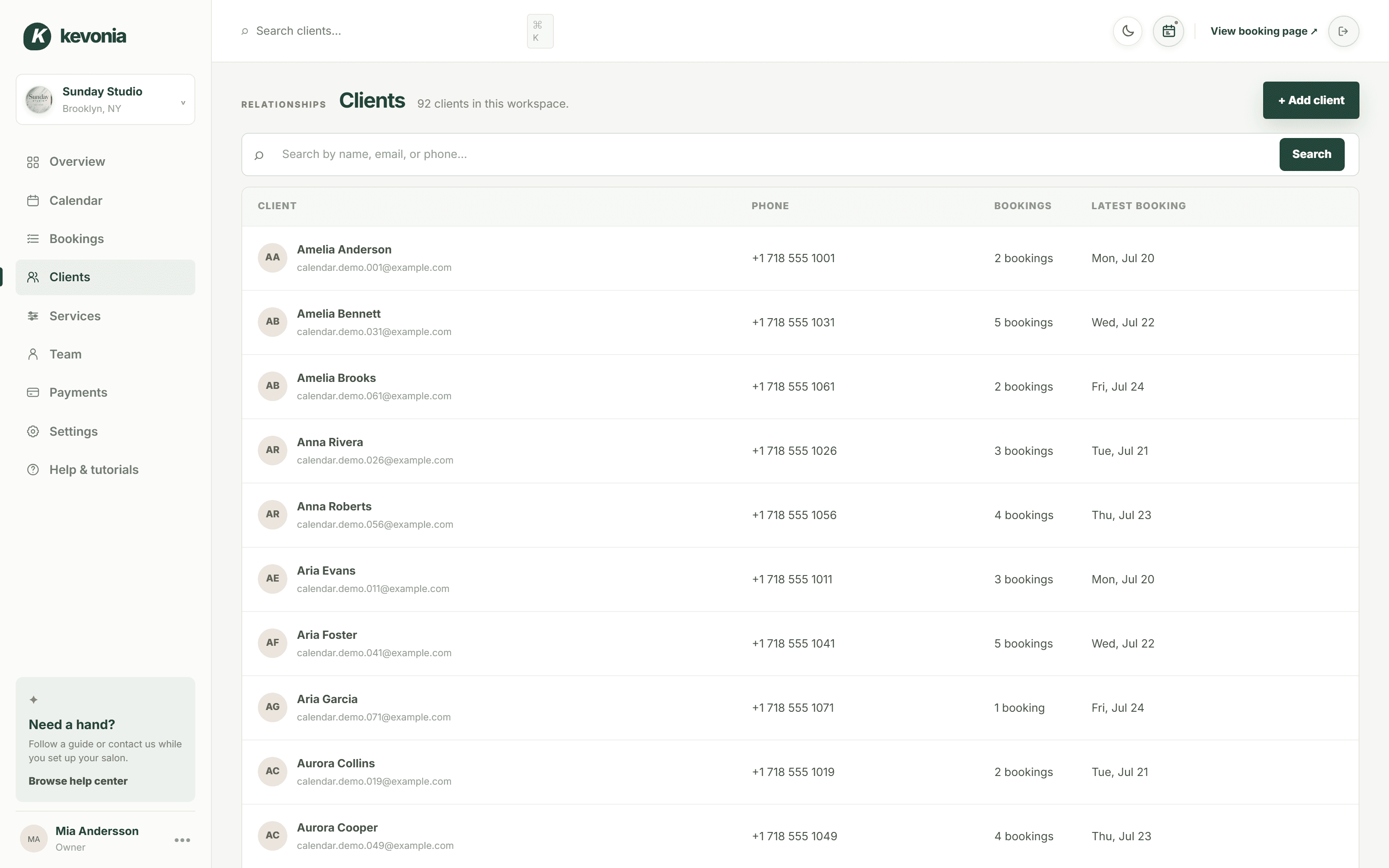
The shape, the length, the colour code from six weeks ago.
Every client has a record — number, how often she comes in, when she was last on the table — plus a private note only the salon reads. Shape, length, the base she reacts to, the brand and number of the colour she always asks for.
- Type part of a name, email or number to find her
- Visit count and last visit before you open anything
- The note follows her whichever tech takes the booking
app.kevonia.com
03 · THE BOOKING LINK
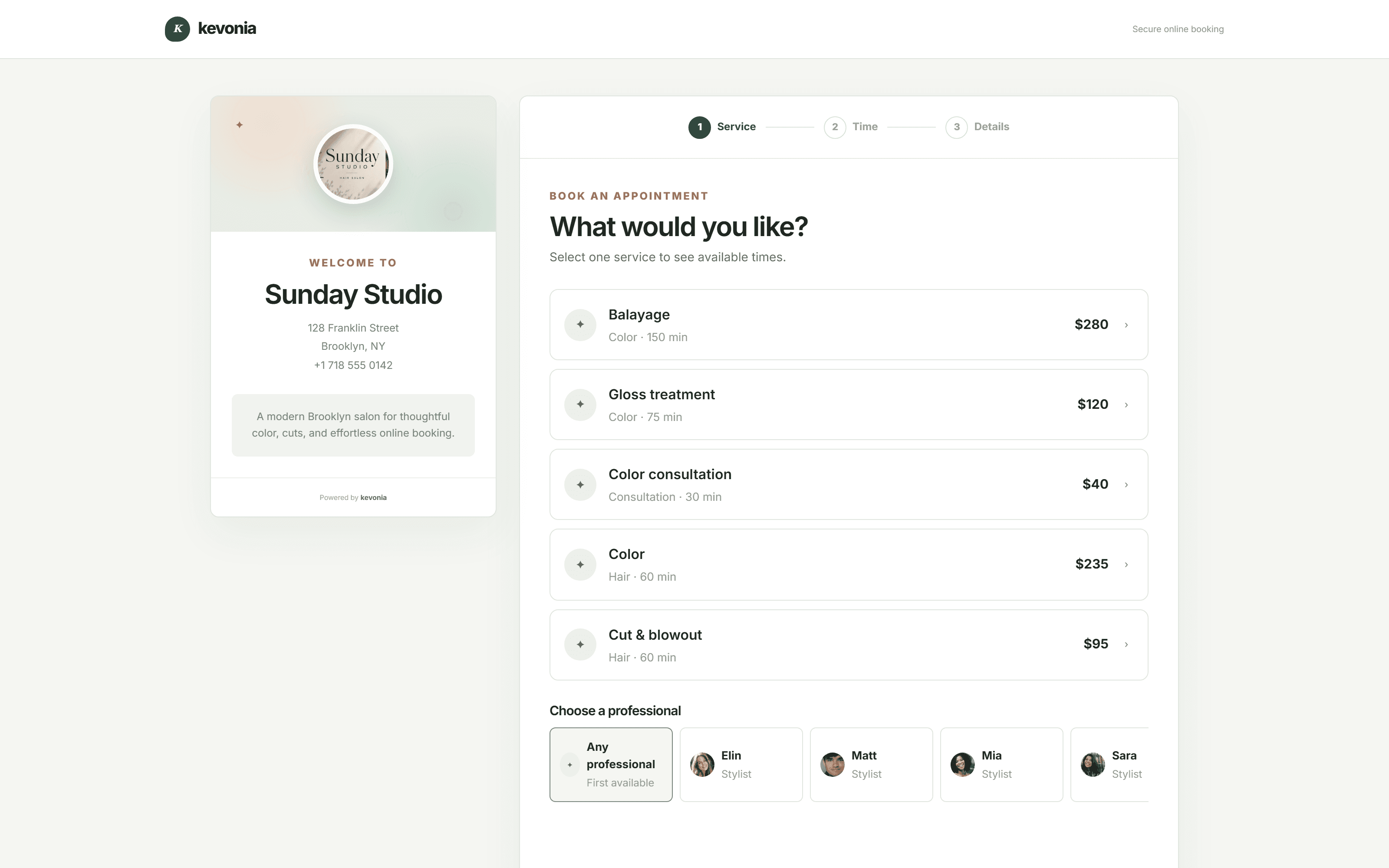
One link in the bio that books while you are cuticle-deep.
Clients open your page, choose the service, choose their technician, and only see the times where she genuinely has a long enough gap — cleanup included. They enter their details and it drops into your week straight away.
- Only techs who do that service are offered
- A gap too short for a full set never appears
- Take a deposit before the slot is held
app.kevonia.com
WHAT IT DOES
Precise where the timing matters. Plain everywhere else.
A technician starting on Tuesday should be working her own column by the afternoon, with nobody standing over her.
Bookings after you close
Clients book their infill on the sofa at eleven at night. Your page is awake then, offering exactly the times you would offer in person.
A column for each technician
Week or day, everyone or one person, colour-coded so it is obvious at a glance whose client has just walked in.
Design notes that stay put
Shape, length, brands, colour codes and reactions live on the client, not in one technician's phone, so any tech can pick it up.
Services timed like real nails
Soak-off, infill, full set, pedicure, art — each with its own length, its own cleanup, its own price and its own deposit.
Hours that match the rota
Different hours per day, breaks through the shift, technician leave, and the closures around training and stock days.
One client per table
Every save is checked against hours, breaks, leave, closures and existing bookings, so two clients never turn up for the same tech.
Long sets that stay booked
A reminder goes out the day before with links to move or cancel. A three-hour set handed back on Friday night can still be sold on Saturday.
ONE PRICE. ALL OF IT.
What Kevonia Business gives a nail salon.
No tiers, no charge per technician, no cut of your takings. Every item below is switched on from the first minute of the trial.
The salon calendar
Where the day gets run from.
- A full week, or one day close up
- Filter down to one technician
- A colour for every person on the floor
- Take it, change it, move it or drop it in the grid
- Clash check on every single save
- Notes written on the booking itself
Your booking page
Your salon, not somebody's directory.
- kevonia.com/your-salon, and no one else's
- A photo of the salon, what you do, where and when
- Service, then technician, then date, then time
- Times that do not exist are never offered
- Made for booking from a phone
- Switch online booking off whenever you want
Your client list
The book of regulars, searchable.
- No cap on how many clients you keep
- Bring a client up from whatever you remember
- Her visit count and the date she last came
- Private notes for shapes, brands and reactions
- Stays quick however long the list gets
- Her details filled in on every booking
The nail menu
Timed and priced the way you actually work.
- Every set, infill and pedicure, grouped as you like
- Service time plus cleanup between clients
- A price, and a deposit on the ones worth it
- Assign each service to the techs who do it
- Keep a service off the online page
- What she reads before she picks it
Technicians and hours
The right tech, bookable at the right time.
- Unlimited technicians, no per-table fee
- A photo, a colour, an email and a number
- Her own list of services
- The hours each tech is in, day by day
- Breaks across the day, each one named
- Leave, holidays and salon closures
Money
Card payments and a clear record of them.
- Card payments handled by Stripe
- Deposits on the sets worth protecting
- Payment status shown on the booking
- Every transaction, listed and totalled
- Paid out to the salon's own account
- Stripe joined up from inside the app
Booking rules
The salon sets the terms.
- The furthest out anyone can book
- How much notice you require
- The slot interval your services need
- Time zone, currency and the salon's own details
- Cancelled bookings kept, and restorable
- Light and dark theme
What clients receive
Confirmed, reminded, able to sort themselves out.
- Confirmation the moment she books
- A nudge the day before
- She can move the appointment herself
- She can cancel inside your notice window
- Word reaches you straight away
- Refund emails going out on their own
Getting started
Nobody leaves you with a blank screen.
- A checklist sitting there on your first login
- Written guides and quick videos
- Google or email, whichever you already use
- A worked-in demo salon to play with
- Not a single feature held back while you try it
- No setup fee, nothing to sign
BEFORE AND AFTER
Where a nail salon quietly loses its best slots.
Not on the work. On the message answered forty minutes late, the colour code nobody wrote down, and the three-hour set that vanished at nine the night before.
In the salonDMs & a paper bookWith Kevonia
Booking an infillA message answered between clients, if at allShe books the free slot herself, any hour
Who is free SaturdayThree people leaning over the same bookFilter to that tech and read her week
A three-hour setMarked out by hand and left to luckThe service carries its own length and deposit
Two clients, one tableBoth arrive, one waits or leavesThe second booking is refused outright
Last time's colourIn a tech's memory, or goneOn the client record, found in seconds
A late cancellationAn empty table nobody finds out aboutYou are told at once and the slot reopens
Getting paidCash, or a card machine at the deskPaid online, or deposit now and balance in salon
ONE SET
The month costs roughly one full set.
Recover one no-show with a deposit, or let a client book a Wednesday afternoon that would otherwise have sat empty, and the subscription is already covered. Nothing is taken from anything you earn after that.
NO TWO NAIL SALONS MATCH
A three-table nail bar and a solo home studio need the same flexibility, not the same template.
Set your own services, lengths, cleanup time, prices, deposits, opening hours and booking window. Kevonia shapes itself around the way your salon already works rather than asking you to change how you work at the table.
Set your salon up01Nail salons↗02Nail bars↗03Acrylic specialists↗04Gel & BIAB studios↗05Nail art studios↗06Pedicure spas↗07Manicure bars↗08Nail & beauty salons↗09Mobile nail techs↗10Home studios↗11Nail suites↗12Nail academies↗13Nail & lash bars↗
THREE STEPS AND YOU ARE OPEN
Most nail salons are taking bookings the same afternoon.
Get the basics in, put the link out, and refine the detail between clients over the next few days.
Describe the salon
Name, photo, address, time zone, currency, and how far ahead clients are allowed to book.
Add the menu and the team
Every set, infill, soak-off and pedicure with its length and price, then your technicians and their hours.
Put the link out
Instagram bio, Google Business Profile, your website, or a QR code on the counter.
SALONS ALREADY USING IT
The fee usually vanishes inside the first few weeks.
Fewer messages left hanging, fewer gaps midweek, and tables that keep filling long after you lock the door.
We've been using Kevonia for several months and it has completely changed how we manage appointments. Our clients love how easy it is to book online, and we save hours every single week.
Emily Carter
By far the best salon booking software we've used. It saves us time every day, and the online booking process has increased the number of appointments we get.
David Thompson
The automatic reminders have significantly reduced our no-shows, and scheduling has never been easier. It's simple, reliable, and our clients constantly compliment the booking experience.
Ashley Brooks
I was surprised by how easy it was to get started. Within a single day our entire salon was set up and running smoothly. The interface is clean, modern and genuinely easy to use.
Jessica Miller
Managing multiple stylists used to be a challenge, but this keeps everyone's schedule organised. It helps us stay more efficient while giving our clients a better experience.
Michael Johnson
Excellent software with outstanding support. Our clients appreciate being able to book anytime, and we appreciate having everything in one place. I'd recommend it to any salon owner.
James Wilson
Take the free fortnightNo credit card today · $49.99/month after · Cancel anytime
ONE FEE, NOTHING ELSE
Two weeks free. Then only if you want it.
Fourteen days with everything switched on and no card taken. If it has not made the salon run better by the end of them, do nothing and it simply stops.
- No card asked for to begin
- Nothing to join, nothing to sign, nothing to give notice on
- The whole of every booking is yours
KEVONIA BUSINESS$49.99/month
14 DAYS FREE- Unlimited bookings, clients and services
- Unlimited technicians
- A booking page with your salon's name on it
- Week and day salon calendar
- Client records with private design notes
- Cards and set deposits, run through Stripe
- Breaks, leave and salon closures
- Booking window and notice rules
- Cancelled bookings kept, and restorable
- Guides, videos and a dark screen
No credit card today. Cancel before your trial ends and you are never charged.
Nothing up front
The trial starts without a card. If it does not suit the salon, ignore it and it ends by itself.
Bookable today
The menu, the technicians and the hours are the whole setup. Most salons share their link within the hour.
Your clients are yours
The client list and every note on it belong to the salon, and card details are handled entirely by Stripe.
OTHER TRADES, ONE CALENDAR
Nails plus lashes, brows or hair? All the same setup.
Most nail salons add something else eventually. Nothing about the software changes — you add the service and the person who does it. These pages cover the same workspace for each trade.
Open the demo salon01Hair salon booking software↗02Barbershop booking software↗03Beauty salon booking software↗04Spa booking software↗05Salon reservation software↗06Salon booking program↗07Hairdressing booking system↗08Barber shop appointment software↗09Online spa scheduling software↗10Esthetician scheduling software↗
COMMON QUESTIONS
What salon owners ask before moving over.
Rather try it than read about it? Open the live demo workspace and run through a full week of tables.
What makes this nail salon booking software rather than a general calendar?+
Nail services vary from a twenty-minute soak-off to a three-hour set with art. Kevonia gives every service its own duration, its own cleanup time, its own price, its own deposit and its own list of technicians, and the booking page only ever offers slots where all of that genuinely fits.
Can each technician have her own hours and services?+
Yes. Every technician gets her own working hours per weekday, her own breaks, her own leave and her own service list. The calendar shows the whole salon side by side, or narrows to one person in a click.
How do clients book a full set online?+
They open your booking link, choose the service, choose a technician who performs it, and see only times where she has a gap long enough for the whole appointment including cleanup. They enter their details and it lands in your calendar immediately.
Can I ask for a deposit on long appointments?+
Yes. Connect Stripe and put a deposit on any service. Most salons leave a quick infill free to book and take a deposit on full sets, extensions and detailed art — the appointments a no-show really costs you.
Where do colour codes and shapes get written down?+
In the private notes on the client record, next to her visit history. Only your team sees them, and they stay with her whichever technician takes the next booking.
Does it leave cleanup time between clients?+
Yes. Each service carries a cleanup period on top of the service time, and the booking page counts it in — so a client can never take a slot that leaves you no time to clear and sanitise the table.
What stops two clients booking the same technician?+
Every save is checked against your opening hours, her breaks and leave, any salon closure and every existing booking. A clash is refused rather than saved and dealt with later.
Is there a cost per technician?+
No. One flat price covers unlimited technicians, bookings, clients and services, so adding another table costs you nothing in software.
How much time does setting it up take?+
Usually well under an hour. Salon details, service menu, technicians, opening hours — then share your link. A checklist inside the app walks you through each step.
What happens after the fourteen days?+
Nothing is charged during the trial and no card is asked for to start it. After that it is $49.99 a month, cancellable from your billing settings whenever you like.
Can I look around before creating an account?+
Yes. The demo workspace is a fully loaded salon with bookings, technicians, services and takings already in it, so you can work the calendar before typing in an email address.
THE TABLE IS SET
Do the nails.
Let the link do the booking.
Fourteen days of the complete salon workspace, every feature open, no card taken, and nothing to cancel if you walk away.
No charge today · $49.99/month after your trial · Cancel anytime