Salon reservation software
Salon Reservation Software
Let clients reserve their own slot at any hour, hold it with a deposit if it is worth protecting, and remind them the day before. One calendar for the whole team, and nothing landing on top of anything else.
- Clients reserve their own time, day or night
- A deposit holds the slots you cannot afford to lose
- A prompt the evening before, with links to move or cancel
- Cancel inside your window and the slot goes back on sale
Free for 7 daysNo credit card todayThen US$49.99/month, cancel anytime






Salon owners already taking reservations through Kevonia. Read their accounts
Everyreservation, held
and accounted for
and accounted for
Live Kevonia walkthrough
Reservations openClients holding slots right now
Hair salons Beauty salons Nail salons Day spas Barbershops Tattoo studios Massage studios Aesthetic clinics Wellness centres Brow bars Waxing studios Hair removal clinics Salon suites
NOT A SCREENSHOT
Try before you buy — no signup required.
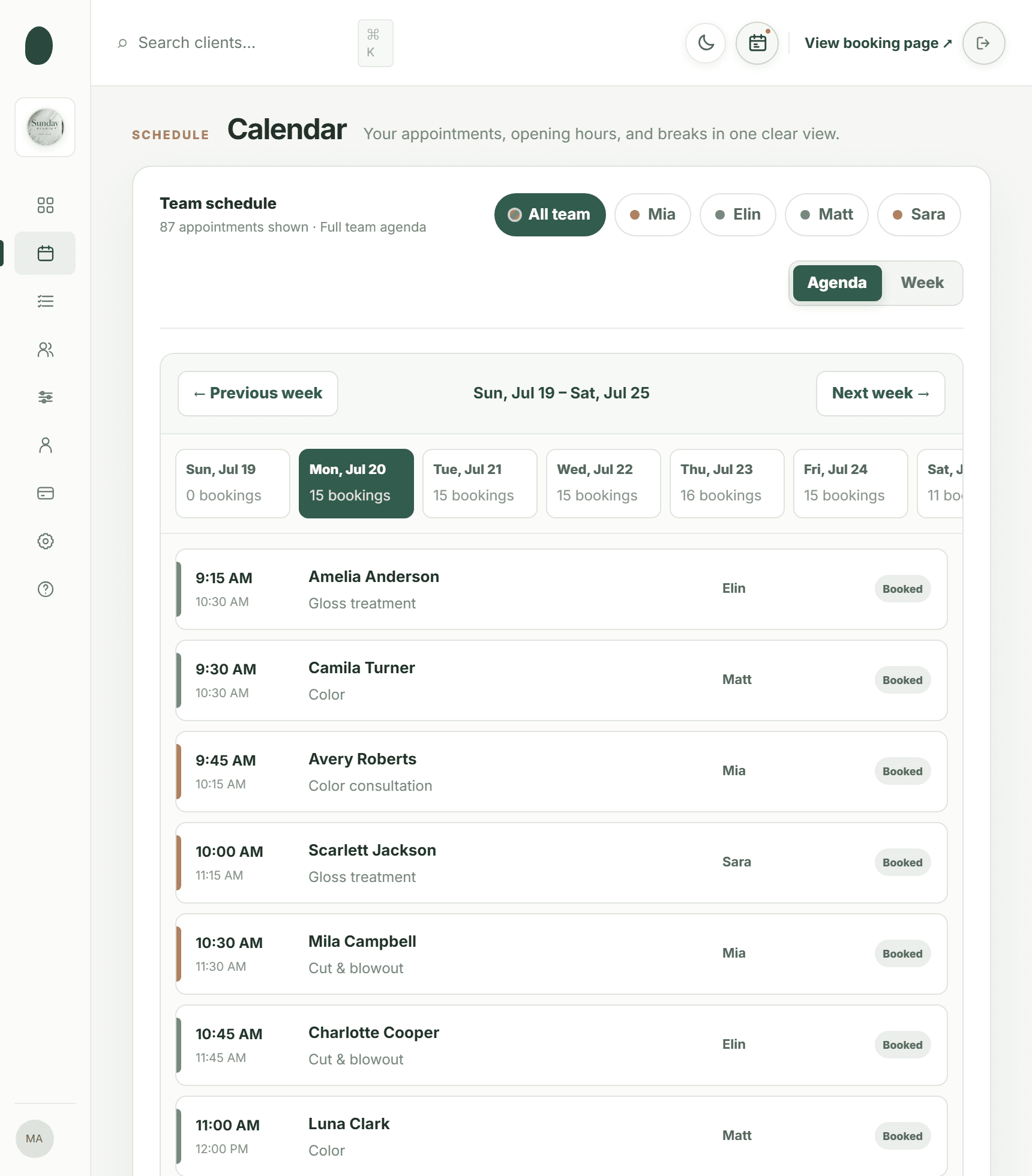
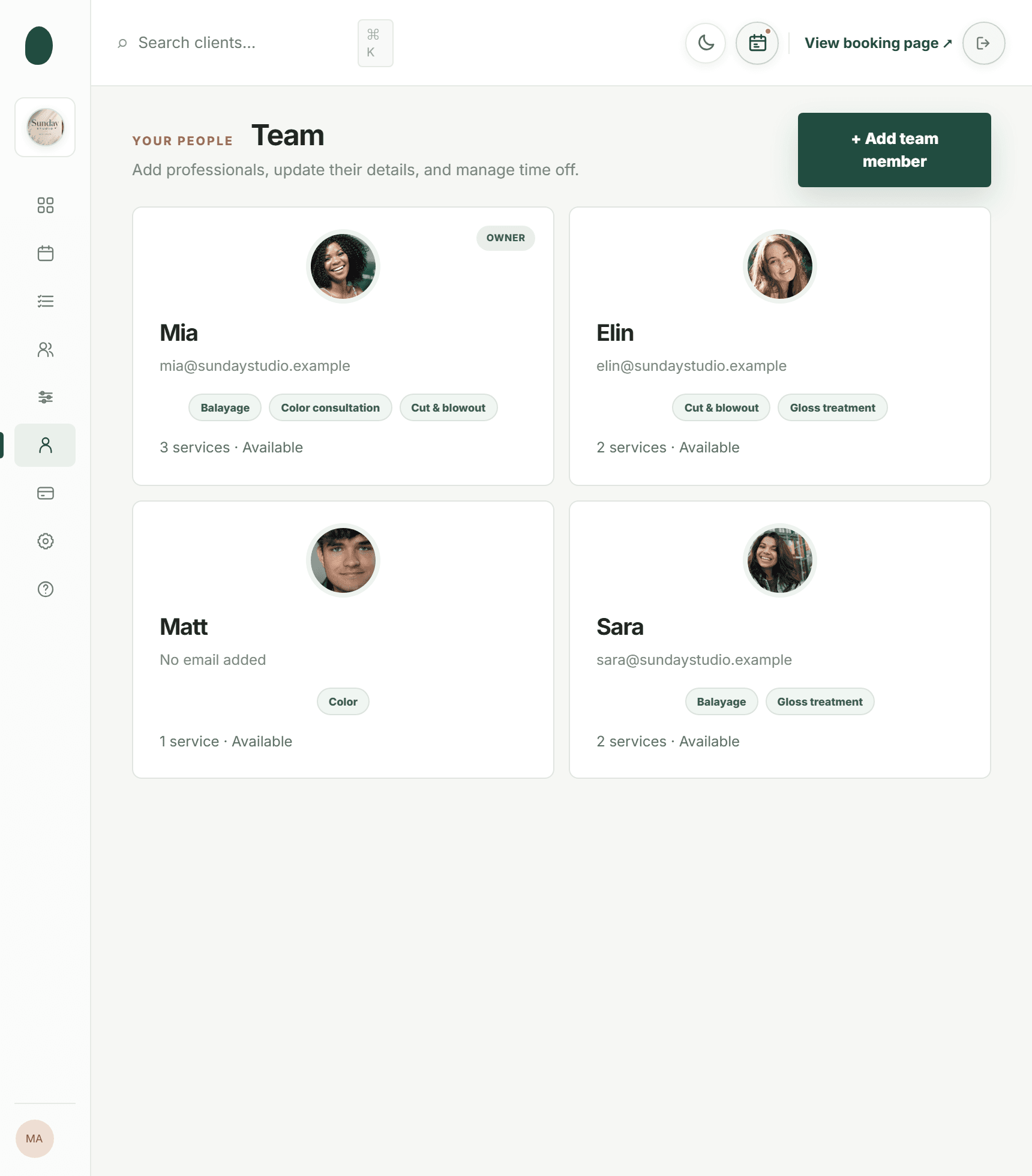
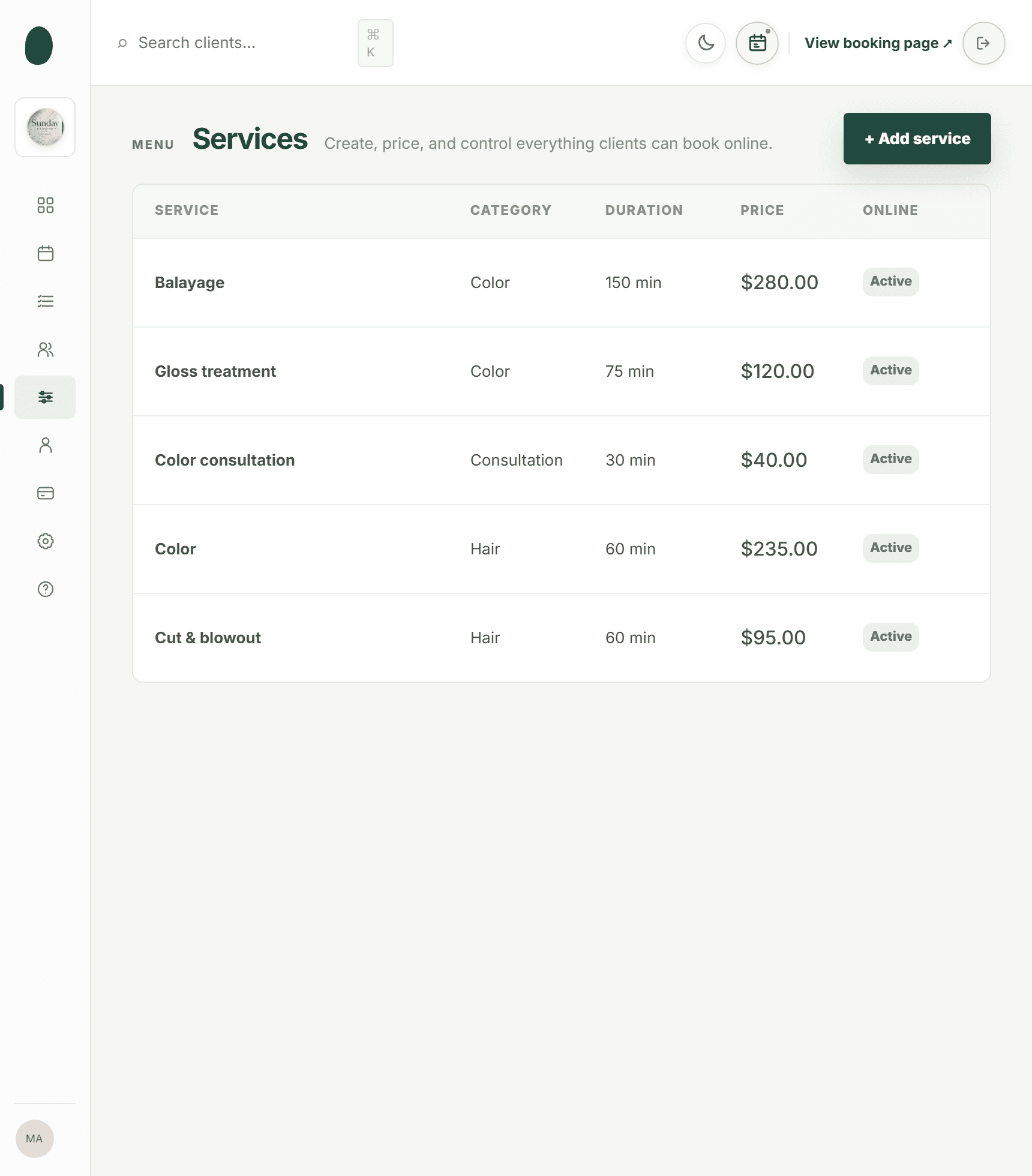
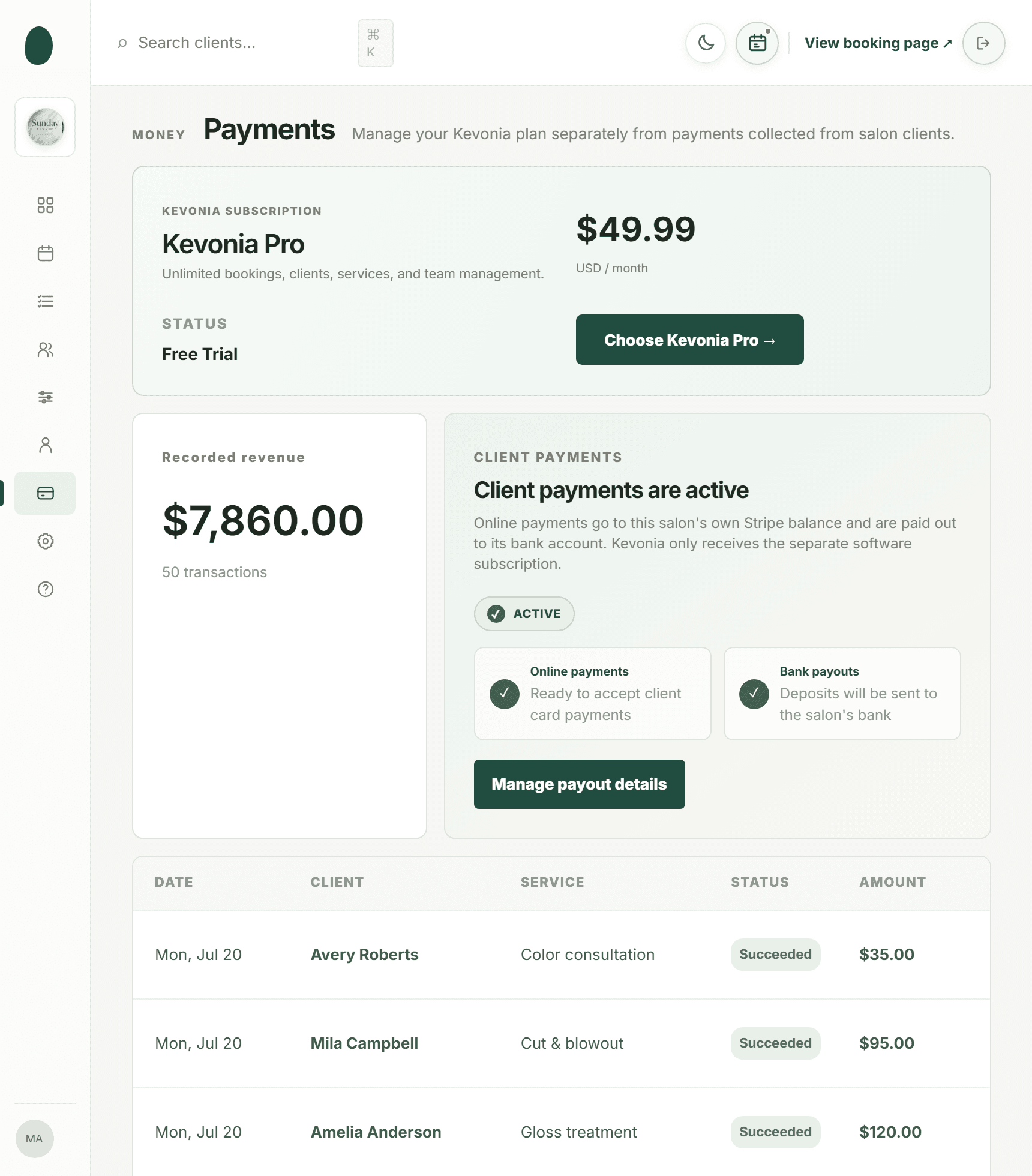
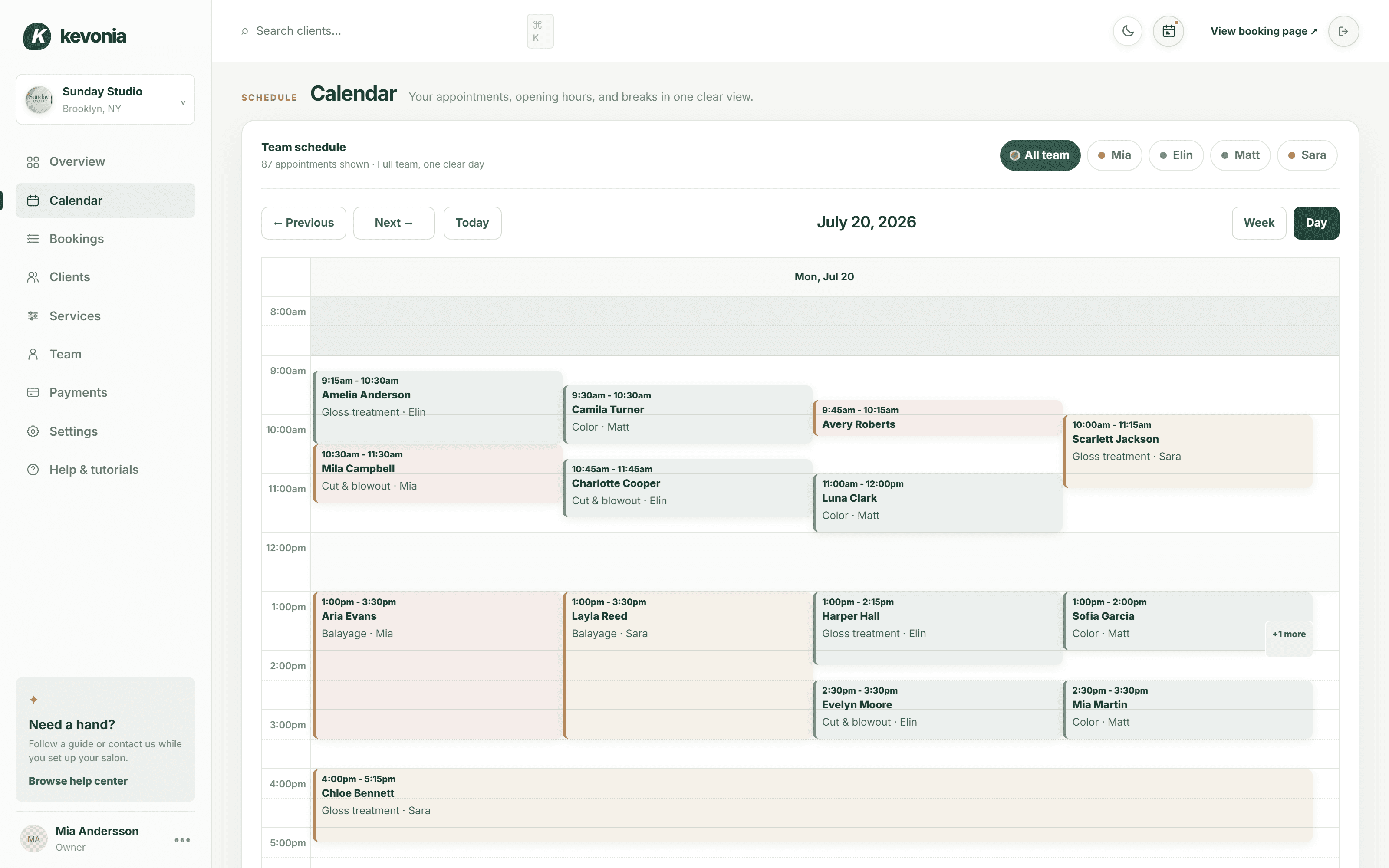
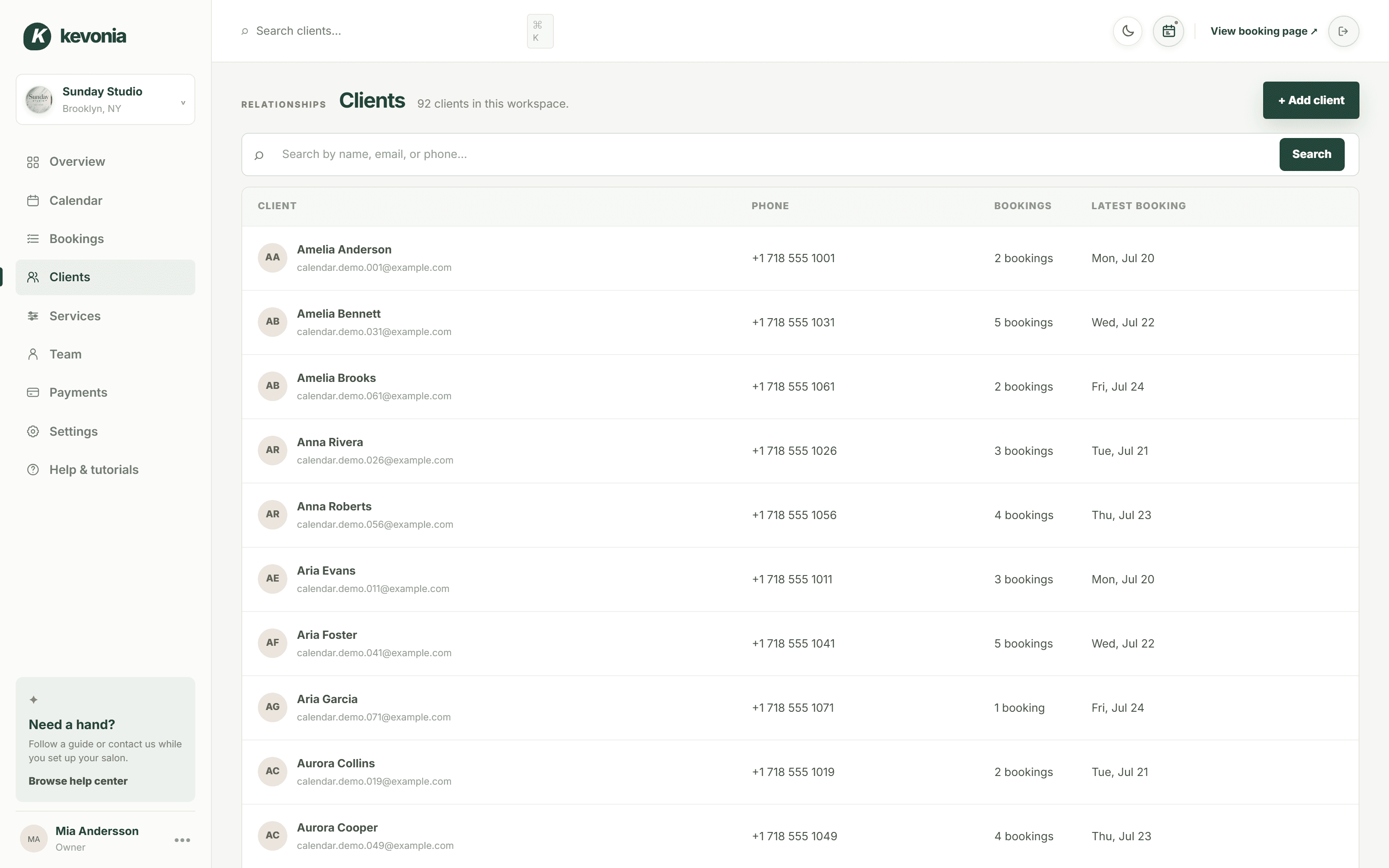
The calendar, the client list, the service menu, the payouts — the same screens a salon owner opens every morning, filled with Sunday Studio's day. On a computer, the menu switches between them.
Open the full demo workspace →kevonia.com/dashboardCLICK THE MENU TO EXPLORELIVE PREVIEW
K kevonia

Sunday StudioBrooklyn, NY
✦Need help?
Follow a guide or contact us while you set up your salon.
Browse help centerMA
Mia AnderssonOwner
•••Sunday Studio demo · Explore every section with protected example data.Create your own workspace →
MONDAY, JULY 20
Good afternoon, Sunday Studio
Here's what's happening at your salon today.kevonia.com/sunday-studioShare booking URL+ New booking
Today's revenue
↗Appointments
▣Total clients
♟No-shows
◷Revenue, last 30 days$31,670 collected across 25 trading days
BEST DAY
$2,070Jul 3- Jun 24 · $496.80
- Jun 25 · $1076.40
- Jun 26 · $621.00
- Jun 27 · $1614.60
- Jun 28 · $1159.20
- Jun 30 · $1179.90
- Jul 1 · $372.60
- Jul 2 · $1097.10
- Jul 3 · $683.10
- Jul 4 · $1138.50
- Jul 6 · $1283.40
- Jul 7 · $558.90
- Jul 8 · $910.80
- Jul 9 · $641.70
- Jul 10 · $1573.20
- Jul 11 · $1200.60
- Jul 13 · $1242.00
- Jul 14 · $538.20
- Jul 15 · $1055.70
- Jul 16 · $434.70
- Jul 17 · $1697.40
- Jul 18 · $1635.30
- Jul 19 · $931.50
- Jul 20 · $331.20
Today's schedule14 appointments · 4 team members
- AAAmelia AndersonGloss treatment · 75 min
WITHElin
Confirmed••• - CTCamila TurnerColor · 60 min
WITHMatt
Confirmed••• - ARAvery RobertsColor consultation · 30 min
WITHMia
Confirmed••• - SJScarlett JacksonGloss treatment · 75 min
WITHSara
Confirmed••• - MCMila CampbellCut & blowout · 60 min
WITHMia
Confirmed•••
Team todayLive schedule
- Mia3 appointments
- Elin4 appointments
- Matt4 appointments
- Sara3 appointments




PAYMENTSPayments are activeClient payments are ready.
THE SAME SALON, FROM THE OTHER SIDE
And this is what your clients see.
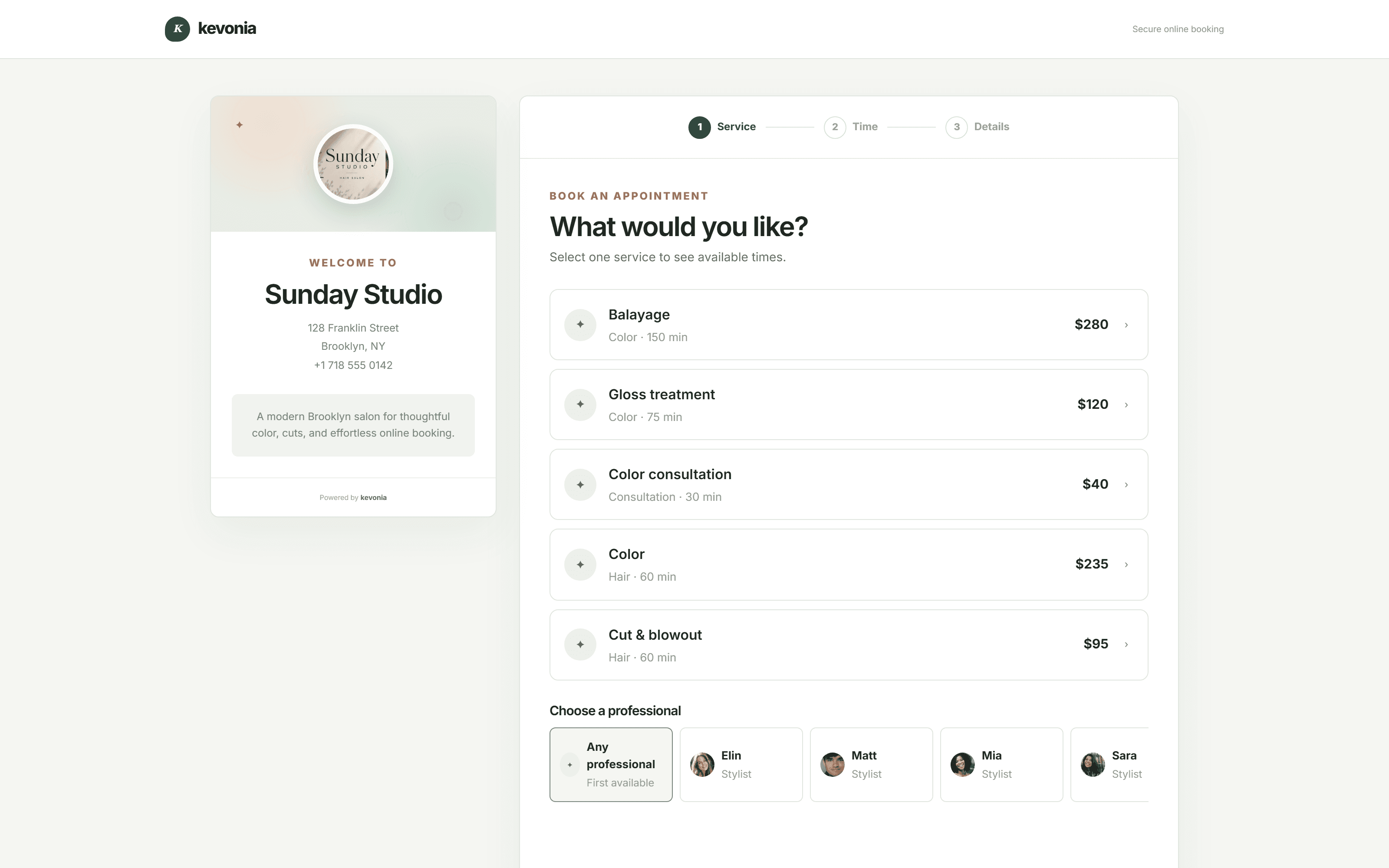
The page Sunday Studio shares from its Instagram bio, live on this one. Every salon gets the same one at kevonia.com/your-salon, with its own name, photo, service menu and team — and clients book from it without an account.
Open the booking page →This is your own salon, fifteen minutes from now.Free for 7 days. No credit card, and no commission on your bookings.
Start free for 7 days →A RESERVATION THAT MEANS SOMETHING.
Salon reservation software built around the slot actually being kept.
Anyone can write a name in a diary. The hard part is the slot still being wanted the following Tuesday. Kevonia lets clients reserve for themselves, secures the appointments worth securing with a deposit, reminds everyone the day before, and hands the time straight back to the page the moment somebody cancels.
THE SOFTWARE, FILMED
From an empty slot to a reservation that sticks.
Under thirty seconds in the workspace itself: today's figures, one person's week drawn out of the team view, arranging their profile, and a client reserving a slot without a call.
Walk through the demo →A salon taking reservations28 SEC
FILMED IN KEVONIA
01
TODAY · 10 SEC
What is actually booked
The takings so far, the reservations in the diary, and who is working.
02
THE WEEK · 11 SEC
Narrow it to one person
Step from the full team down to a single week without losing the thread.
03
THE TEAM · 09 SEC
Set someone up
What they do, when they work, and the weeks they are not around.
04
RESERVING · 11 SEC
A client holds a slot
Service, person, a genuinely free time, and a deposit to secure it.
Want to watch your own diary fill?Seven days with nothing held back, and no card needed.
Open your salon free →THE DIARY, WITHOUT HUNTING
Four screens that answer the morning's questions.
What is reserved, who is working, what each thing costs, and what has cleared into the account.
01 · HOLDING THE SLOT
A deposit turns an intention into a commitment.
Put a deposit on any service you choose. The client pays it as part of reserving, the amount comes off what they owe on the day, and the slot is genuinely held rather than pencilled in. Cheap and quick services can stay free to reserve.
- Set the deposit per service, not across the board
- Paid at the moment of reserving, not chased afterwards
- Payment status visible on the reservation itself
app.kevonia.com
02 · KEEPING THE SLOT
The reminder that stops a quiet Tuesday.
An email goes out the day before with links to move or cancel. That sounds like an invitation to cancel, and it is — which is the point. A slot handed back at eight the night before can still be sold. Somebody who simply does not arrive cannot be replaced.
- Automatic, with no list to remember to send
- The client reschedules without ringing you
- You are told the moment anything changes
app.kevonia.com
03 · SELLING THE SLOT AGAIN
A cancellation should not mean an empty hour.
The instant a client cancels inside your notice window, the time reappears on your reservation page for anyone else to take. The cancelled booking is kept, not deleted, so you can restore it if the client rings back an hour later.
- The freed time is bookable again straight away
- Cancellations stay searchable rather than vanishing
- Restore a cancelled reservation in a click
app.kevonia.com
WHAT IT LOOKS AFTER
Strict about the slot. Relaxed about everything else.
The rules should be firm where money is involved and invisible everywhere else.
A page that never closes
Most reservations get made in the evening, once people have stopped working. Your page is awake then, showing exactly what you would offer over the counter.
Deposits where they earn their keep
Choose which services need money up front. Long or high-value appointments are the ones a no-show really costs, so those are usually the ones to protect.
Reminders sent for you
The day-before email goes out without anybody remembering to send it, and carries the links to move or cancel.
A notice window you decide
Set how much warning you need. Inside it, clients cancel themselves. Outside it, they have to speak to you.
One reservation per slot
Hours, breaks, leave, closures and existing reservations are all checked before anything is allowed to save.
A record of who does this
Visit history sits on the client, so the person who cancels three times running is not a mystery the fourth time.
Nothing deleted in anger
Cancelled reservations are kept and searchable, and any of them can be restored if the client changes their mind again.
ONE FEE. EVERYTHING IN IT.
What Kevonia Business covers.
No tiers, no charge per person, no slice of what you take. Everything on this page works from the first minute of the trial.
The reservation diary
Where the day is actually run from.
- A seven-day view, and a single-day one
- Filter down to one person
- A colour for everyone on the team
- Enter, amend, shift or release it in the grid
- Conflicts caught before saving
- Notes written on the reservation
The page clients use
Your own address, your own salon.
- kevonia.com/your-salon, exclusively yours
- A picture, a description, where you are, when you open
- Service, then person, then day, then time
- Times that are gone are never offered
- Made for reserving on a phone
- Close online reservations when you need to
The client book
Who they are, not just when they are in.
- No limit on how many you keep
- Type any fragment of a name, email or number
- Visits so far and the date of the last
- Private notes only your team reads
- Quick however long the list gets
- Details carried onto every reservation
The menu
Timed and priced the way you charge.
- However many services your menu runs to
- Length plus cleanup between clients
- Its own price, and its own deposit if you set one
- Assign each service to the right people
- Keep something off the online page
- The wording a client reads before choosing
People and hours
Reservable when they are genuinely there.
- Unlimited team, never a per-seat fee
- A face, a colour, an email address, a number
- A service list per person
- The hours worked, set weekday by weekday
- Every break in the shift, labelled
- Time off, holidays and whole-business closures
Deposits and payments
Money in, and a clear trail of it.
- Cards processed by Stripe
- A deposit on any service you choose
- Payment status on every reservation
- A history of every transaction
- Settled to a bank account in your own name
- Stripe wired up from within the workspace
The rules
You set the terms, not the software.
- How far into the future reservations may reach
- The notice you require to cancel
- The interval your slots run on
- Zone, currency and the business's own details
- Cancelled reservations held, not deleted
- A light mode and a dark one
What the client gets
Told, reminded, and able to act alone.
- Confirmation the second they reserve
- A prompt the evening before
- They move the appointment themselves
- They cancel inside your window
- You are told the moment it happens
- Refunds confirmed to them automatically
Getting going
Nobody hands you a blank screen.
- A guided checklist on your first sign-in
- Short guides for every screen
- One-tap Google sign-in, or an email
- A populated demo business to try first
- Every capability open for the full fortnight
- No joining fee, nothing to sign
PENCILLED IN VERSUS HELD
The gap between a name in a book and money in the till.
A diary records an intention. It does not remind anybody, it does not take a deposit, and it certainly does not resell the hour when somebody drops out.
The slotWritten in a bookWith Kevonia
Making the reservationA call you have to be free to answerThey reserve it themselves at any hour
Securing itTheir word, and hopeA deposit taken as they reserve
Remembering itDown to the client entirelyA reminder sent the day before
Changing itAnother call during opening hoursThey pick a new time from your diary
Cancelling itYou find out when they do not arriveInside your window, online, and you are told
Refilling the hourNobody knows it is freeBack on the page the moment it is released
Repeat offendersA feeling you cannot proveVisit and cancellation history on the record
ONE SLOT
One kept appointment covers the month.
A single deposit that stops one no-show, or one evening reservation into an hour you had written off, and the subscription is already paid. Nothing is taken from anything you earn beyond that.
EVERY TRADE THAT HOLDS A SLOT
If someone books a time with a person, this fits.
Set your own services, lengths, prices, deposits, hours and notice window. Kevonia does not care whether the slot is a cut, a facial, a massage or a tattoo — it cares that it is held, kept and paid for.
Set your terms01Hair salons↗02Beauty salons↗03Nail salons↗04Day spas↗05Barbershops↗06Tattoo studios↗07Massage studios↗08Aesthetic clinics↗09Wellness centres↗10Brow bars↗11Waxing studios↗12Hair removal clinics↗13Salon suites↗
OPEN THE DIARY IN THREE
Most salons take their first online reservation the same day.
Put the essentials in, share the link, and tune the rules once you see how people use it.
Describe the business
Name, photo, address, time zone, currency, and how far ahead people may reserve.
Build the menu and the team
Every service with its length, price and deposit, then your people and the hours they work.
Put the link where clients look
Your website, Google Business Profile, Instagram bio, or the outgoing message on your phone.
SALONS ALREADY DOING THIS
The fee usually comes back before the first invoice does.
Fewer slots quietly emptying, fewer calls unanswered, and a diary that keeps filling while the door is locked.
We've been using Kevonia for several months and it has completely changed how we manage appointments. Our clients love how easy it is to book online, and we save hours every single week.
Emily Carter
By far the best salon booking software we've used. It saves us time every day, and the online booking process has increased the number of appointments we get.
David Thompson
The automatic reminders have significantly reduced our no-shows, and scheduling has never been easier. It's simple, reliable, and our clients constantly compliment the booking experience.
Ashley Brooks
I was surprised by how easy it was to get started. Within a single day our entire salon was set up and running smoothly. The interface is clean, modern and genuinely easy to use.
Jessica Miller
Managing multiple stylists used to be a challenge, but this keeps everyone's schedule organised. It helps us stay more efficient while giving our clients a better experience.
Michael Johnson
Excellent software with outstanding support. Our clients appreciate being able to book anytime, and we appreciate having everything in one place. I'd recommend it to any salon owner.
James Wilson
Reserve your free weekNo credit card today · US$49.99/month after · Cancel anytime
ONE PLAN. NOTHING TIERED.
A week free. Then only if it has earned it.
Everything is on for seven days and no card is taken to begin. If your diary is not better off at the end of them, do nothing and it stops by itself.
- No card taken to start the trial
- No fee to join, no term to serve, no notice to give
- Every penny of every reservation stays yours
KEVONIA BUSINESSUS$49.99/month
7 DAYS FREE- Unlimited reservations, clients and services
- Unlimited team members
- A reservation page that carries your name
- Week and day team calendar
- Client records with private notes
- Deposits and balances taken through Stripe
- Breaks, leave and full closures
- Notice window and booking horizon
- Cancelled reservations held, not deleted
- Screen-by-screen guides and a dark theme
No credit card today. Cancel before your trial ends and you are never charged.
Nothing to lose
No card is taken to begin. If it does not suit the business, leave it and the trial closes itself.
Reservable within the hour
The menu, the team and the hours are the whole of setup. Most salons share their link the same afternoon.
Your client book is yours
Client details and reservation history belong to your business, and card data is handled entirely by Stripe.
THE SAME SOFTWARE, YOUR WORDS
Looking for something more specific to your trade?
These pages describe the same workspace in the language of a particular business. The software underneath does not change — only the examples do.
Or just open the demoSTRAIGHT ANSWERS
What owners ask before switching over.
Rather see it than read it? Open the live demo workspace and take a reservation yourself.
How is salon reservation software different from a booking diary?+
A diary records that somebody said they would come. Kevonia takes the deposit that makes them mean it, sends the reminder that makes them remember it, lets them move it without ringing you, and puts the hour back on sale the second they cancel.
Do I have to take a deposit on everything?+
No, and most salons should not. Deposits are set per service. Short, cheap appointments usually stay free to reserve, and the money is asked for on the long or high-value slots where a missed appointment genuinely hurts.
What happens to the deposit on the day?+
It comes off what the client owes. The reservation shows what has been paid and what is outstanding, so whoever takes the balance can see it without asking anyone.
Can clients cancel whenever they like?+
Only inside the notice window you set. Beyond that point the online cancel link stops working and they have to contact you, which is exactly the conversation you want to be having about a late cancellation.
What happens to the slot when somebody cancels?+
It becomes bookable again immediately, and you are notified. The cancelled reservation itself is kept rather than deleted, so if the client rings back you can restore it instead of re-entering everything.
Can two people reserve the same time?+
No. Every save is checked against your opening hours, that person's breaks and leave, any closure, and every reservation already in the diary. A clash is refused outright rather than saved and untangled later.
Do clients need an account?+
No. They choose a service, a person and a time, then leave their contact details. There is nothing to sign up for and nothing to install.
Is there a charge per team member?+
No. One flat price covers unlimited people, reservations, clients and services, so taking somebody on costs nothing extra in software.
How long does it take to set up?+
Usually under an hour. Business details, service menu, team, opening hours — then share the link. A checklist inside the app takes you through each step in order.
What happens after the free trial?+
Nothing is charged during the seven days and no card is needed to begin. Afterwards it is US$49.99 a month, cancellable from your billing settings whenever you want.
Can I look round before creating an account?+
Yes. The demo workspace is a fully populated salon with reservations, staff, services and revenue already in it, so you can work the diary before typing in an email address.
From the blog
Running a salon, written down

Comparison
DaySmart Salon Alternative: Compare Cost, Control, and Fit
DaySmart Salon is capable, but its tiered pricing and broad feature set are not right for every salon. Compare the practical trade-offs before switching.
·12 min read

Comparison
PocketSuite Alternative: The Better Fit for Salon Teams
Looking for a PocketSuite alternative? Compare PocketSuite and Kevonia on pricing, payment fees, salon workflows, team scheduling, and booking limits.
·11 min read

Comparison
Using Google Calendar for Salon Bookings: Where It Works and Where It Breaks
Google Calendar can handle simple appointment scheduling, but salons often outgrow it when they need services, staff rules, deposits, reminders, and client records in one place.
·12 min read

Comparison
Schedulicity Alternative: A Better Fit for Growing Salons
Looking for a Schedulicity alternative? Compare the two systems by pricing clarity, booking control, team calendars, payments, client records, and switching risk.
·12 min read
MAKE THE SLOT STICK
Take the reservation.
Keep the hour.
Seven days of the complete workspace, every feature open, no card taken, and nothing to cancel if you walk away.
No charge today · US$49.99/month after your trial · Cancel anytime